Solved

Adding OTA Commission in Billing Automation

  • June 8, 2026
  • 7 replies
  • 94 views

Hi,

If booking data is imported into Mews via an integration, and OTA commission must be applied before an invoice is generated for the travel agency, can this be included as an automated step within the billing process?

Thanks,

Daira

Best answer by josue.orellana

Hello ​@daira,

I’m Josue - one of the Community Ambassadors - and I’m happy to help clarify your question regarding the OTA commission. 

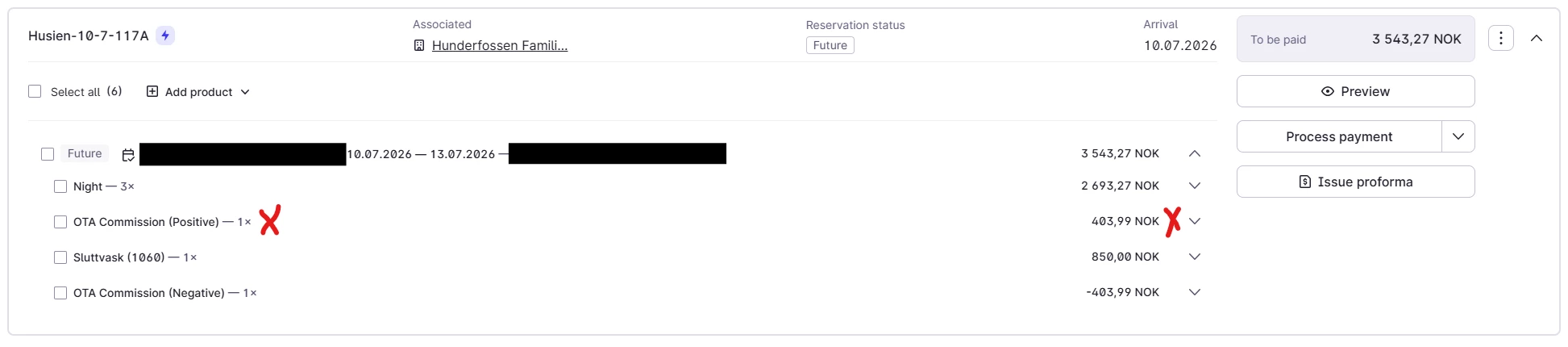
Just to confirm what you're describing: Omniboost is importing reservations into Mews with a positive OTA commission product already attached, and your current workflow is to manually remove that product before issuing the invoice to the travel agency. You're looking to automate that removal step.

The short answer is: Mews product rules can automatically cancel a product from reservations, so in theory you could set up a rule scoped to the relevant rate, origin, or rate group that removes this commission product automatically when the reservation comes in. This would mean it never reaches the bill in the first place, so there's nothing to manually remove before invoicing.

To set that up:

  1. Go to Main menu > Settings > Services and open your bookable service.
  2. From the Settings menu, select Product rules.
  3. Click + and choose the condition that matches these reservations — most likely Origin (to target OTA-sourced bookings) or a specific Rate or Rate group.
  4. Under the Rule action section, select the commission product and set the action to Cancel.
  5. Click Create.

That said, there's an important caveat worth checking first: if the commission product is being pushed by Omniboost on every import regardless of the reservation type, it may be worth looping Omniboost back in to clarify whether that product is intentional on their end or a configuration gap. If it can be excluded at the Omniboost level before it even arrives in Mews, that would be a cleaner fix and would also resolve the ERP accuracy issue you mentioned.

On the ERP side - you're right that as long as this manual step exists, the data won't reflect commission accurately in real time. Automating the removal via a product rule would address that too, since the product would never post to the bill.

For your reference, here is our guide on product rules as well: How to package products using product rules in Mews Operations

If you have any questions, please don’t hesitate to let me know! 😎

~ Best regards, 

7 Replies

Johannes Rott
Community Luminary
Forum|alt.badge.img+2
  • Community Luminary
  • June 8, 2026

Hi Daira,

can you specify this a bit more? You import net rates from the channel? and need a product which is a commission amount on percentage?


  • Author
  • Navigator
  • June 8, 2026

Hi Johannes,

I’m new to both Mews and the company, but it appears that the process works the other way around as previously described: the positive OTA commission product needs to be removed from the bill before an invoice can be issued to the travel agency. Would it be possible to automate such a step?


Robin Gustavsson
Trailblazer
Forum|alt.badge.img+5

Hello,

I'm not sure how much help this will be, as we do not have this issue ourselves, but I'm interested in the topic and will do my best to assist.

Could the positive and negative OTA commissions be related to how your travel agency contracts are set up?

Are you receiving the reservations through a channel manager/CRS, or are you using Mews' direct integrations with the channels?


jessica.becker
Mews Employee
Forum|alt.badge.img+1

Hi ​@daira did Robin’s above response help you or do you need further help here? 


  • Author
  • Navigator
  • June 15, 2026

Hi ​@daira did Robin’s above response help you or do you need further help here? 

Hi Jessica,

I’m afraid I need some further clarification, as I’m not fully following the logic behind the current setup.

Omniboost has previously indicated that the configuration should be as it is (with both positive and negative commission), but without providing a clear explanation of why.

As I’m still new to the company and these systems, I may be missing some context, but based on what I can see, the financial data being transferred to our ERP system does not reflect the commission correctly. At present, commission is not deducted in GL automatically, and it requires manually going into each booking, removing the positive commission, and issuing an invoice to the travel agency.

From my perspective, this means that the data in the ERP system is not accurate in real time, and it may also limit the possibility of using billing automation due to this manual step. That said, I may well be overlooking something, and would appreciate your guidance.


josue.orellana
Community Ambassador
Forum|alt.badge.img+1
  • Community Ambassador
  • Answer
  • June 16, 2026

Hello ​@daira,

I’m Josue - one of the Community Ambassadors - and I’m happy to help clarify your question regarding the OTA commission. 

Just to confirm what you're describing: Omniboost is importing reservations into Mews with a positive OTA commission product already attached, and your current workflow is to manually remove that product before issuing the invoice to the travel agency. You're looking to automate that removal step.

The short answer is: Mews product rules can automatically cancel a product from reservations, so in theory you could set up a rule scoped to the relevant rate, origin, or rate group that removes this commission product automatically when the reservation comes in. This would mean it never reaches the bill in the first place, so there's nothing to manually remove before invoicing.

To set that up:

  1. Go to Main menu > Settings > Services and open your bookable service.
  2. From the Settings menu, select Product rules.
  3. Click + and choose the condition that matches these reservations — most likely Origin (to target OTA-sourced bookings) or a specific Rate or Rate group.
  4. Under the Rule action section, select the commission product and set the action to Cancel.
  5. Click Create.

That said, there's an important caveat worth checking first: if the commission product is being pushed by Omniboost on every import regardless of the reservation type, it may be worth looping Omniboost back in to clarify whether that product is intentional on their end or a configuration gap. If it can be excluded at the Omniboost level before it even arrives in Mews, that would be a cleaner fix and would also resolve the ERP accuracy issue you mentioned.

On the ERP side - you're right that as long as this manual step exists, the data won't reflect commission accurately in real time. Automating the removal via a product rule would address that too, since the product would never post to the bill.

For your reference, here is our guide on product rules as well: How to package products using product rules in Mews Operations

If you have any questions, please don’t hesitate to let me know! 😎

~ Best regards, 


  • Author
  • Navigator
  • June 17, 2026

Hello ​@daira,

I’m Josue - one of the Community Ambassadors - and I’m happy to help clarify your question regarding the OTA commission. 

Just to confirm what you're describing: Omniboost is importing reservations into Mews with a positive OTA commission product already attached, and your current workflow is to manually remove that product before issuing the invoice to the travel agency. You're looking to automate that removal step.

The short answer is: Mews product rules can automatically cancel a product from reservations, so in theory you could set up a rule scoped to the relevant rate, origin, or rate group that removes this commission product automatically when the reservation comes in. This would mean it never reaches the bill in the first place, so there's nothing to manually remove before invoicing.

To set that up:

  1. Go to Main menu > Settings > Services and open your bookable service.
  2. From the Settings menu, select Product rules.
  3. Click + and choose the condition that matches these reservations — most likely Origin (to target OTA-sourced bookings) or a specific Rate or Rate group.
  4. Under the Rule action section, select the commission product and set the action to Cancel.
  5. Click Create.

That said, there's an important caveat worth checking first: if the commission product is being pushed by Omniboost on every import regardless of the reservation type, it may be worth looping Omniboost back in to clarify whether that product is intentional on their end or a configuration gap. If it can be excluded at the Omniboost level before it even arrives in Mews, that would be a cleaner fix and would also resolve the ERP accuracy issue you mentioned.

On the ERP side - you're right that as long as this manual step exists, the data won't reflect commission accurately in real time. Automating the removal via a product rule would address that too, since the product would never post to the bill.

For your reference, here is our guide on product rules as well: How to package products using product rules in Mews Operations

If you have any questions, please don’t hesitate to let me know! 😎

~ Best regards, 

Dear Josue,

Thank you for taking the time to provide such a detailed answer. I really appreciate it.

Your explanation was very helpful in understanding both the logic behind the setup and the capabilities of the system. It also gave me a much clearer picture of the available options for handling OTA commissions.

I'll review the product rule approach internally and also follow up with Omniboost regarding the commission product configuration.

Thank you again for your help and for pointing me in the right direction.

Best regards,
Daira