Solved

Bookable service settings - Options - Field (Channel manager segment, booking engine segment and default segment)

  • March 17, 2026
  • 4 replies
  • 41 views

jmadison
Forum|alt.badge.img

Hello All. I am just at the start of my onboarding, using my onboarding dashboard. I am here, in ‘Adjust accounting settings’ which comes before I even get to the part where I create products for stay:

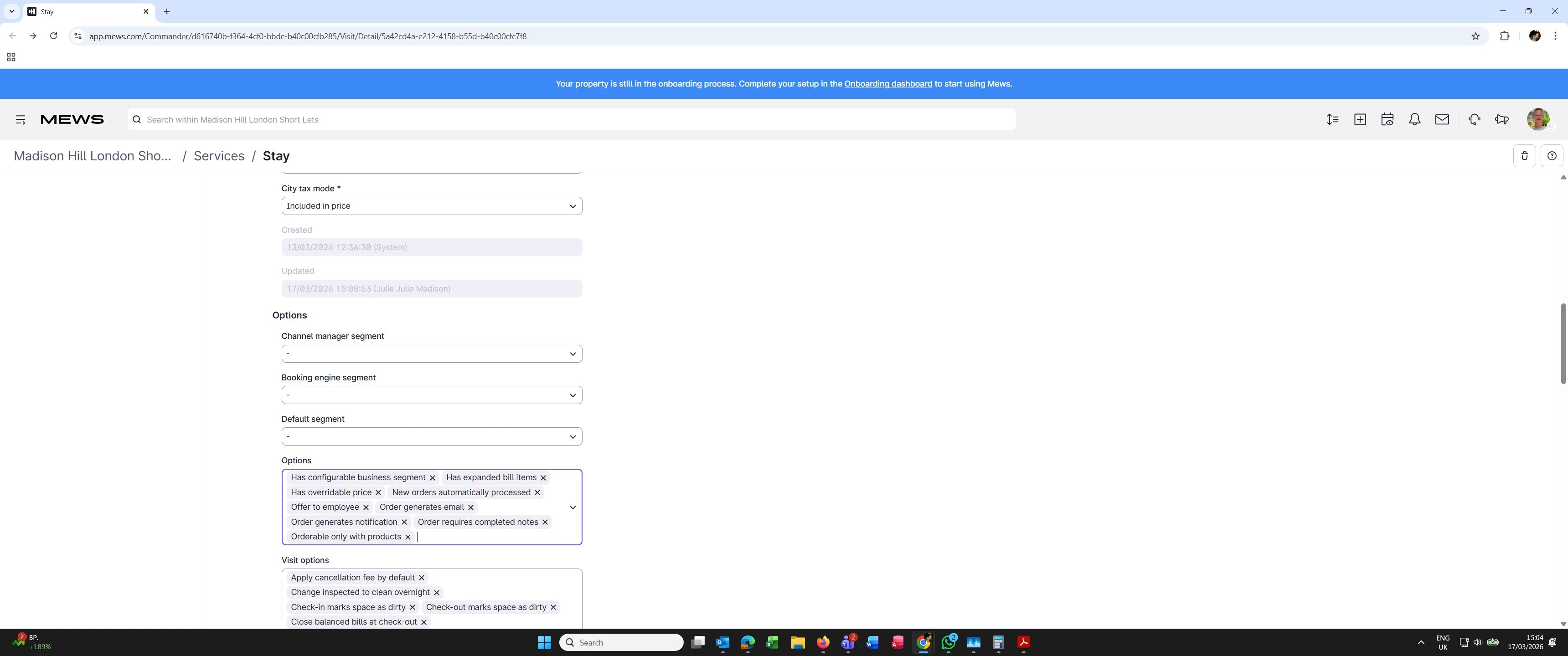
Bookable service settings - Options ( the 3 fields under this heading are Channel manager segment, Booking engine segment and Default segment).

There are drop downs just show a ‘-’ (hyphen) on the left and an arrow on the right. There is nothing to select and I cannot force any entry (such a number) in the field. I cannot save what I have so far entered in this section. The pop up error message is: Cannot require new segment on new orders when no default segment exists (stay)’. Then, if I uncheck ‘new orders require a segment’ I get ‘ no integration enabled for the guest portal usage (stay)’.

Is anyone able to shed any light on my problem? 🙏🏻
 

Best answer by daphne.vanlinge

Hi Julie,

My name is Daphne and I’d be happy to help you with this 😄

The reason you’re not yet seeing any segments to select in the general Bookable Service settings, is because you have not yet created any segments yet; 


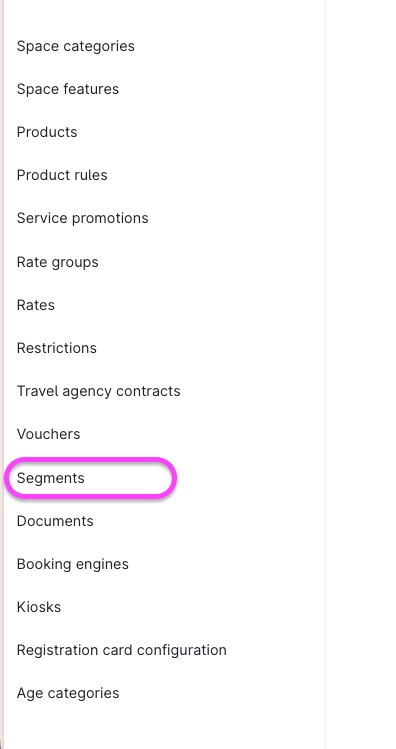
You can do so by going to Settings > Services > Stay > Segments. 

Once created, you should be able to select them in the drop downs you mentioned in your post :) 

For a more detailed help guide with a video, please check out the article here.


If you have any further questions, don’t hesitate to let me know 😄

Warm regards,

Daphne

4 Replies

Forum|alt.badge.img+1
  • Problem-Solver
  • March 17, 2026

Hi Madison,

I think you should be able to create the segments even outside your onboarding dashboard. If you navigate to Settings → Services → Stay → Segments, create 3 of your default segments (Like Web, OTA, General - this can be changed any time later on if needed) so that you can then assign segments to your CHM, Booking engine, and Default. Once this is done, you can go back to onboarding dashboard and continue with the onboarding process.

Let me know in case it doesnt work.


daphne.vanlinge
Mews Employee
Forum|alt.badge.img

Hi Julie,

My name is Daphne and I’d be happy to help you with this 😄

The reason you’re not yet seeing any segments to select in the general Bookable Service settings, is because you have not yet created any segments yet; 


You can do so by going to Settings > Services > Stay > Segments. 

Once created, you should be able to select them in the drop downs you mentioned in your post :) 

For a more detailed help guide with a video, please check out the article here.


If you have any further questions, don’t hesitate to let me know 😄

Warm regards,

Daphne


jmadison
Forum|alt.badge.img
  • Author
  • Navigator
  • March 17, 2026

Hi Daphne, 

WOW, my first question and to have such a clear succinct answer in virtually no time...amazing. Thank you. I am much appreciative.

Kind regards

Julie


jmadison
Forum|alt.badge.img
  • Author
  • Navigator
  • March 17, 2026

Ah, Jan, thank you too. You are very kind.

I will take a look at this and update you again once I have reached success!


Best wishes

Julie