Solved

Rate management / pricing - made difficult (?)

  • September 2, 2025
  • 41 replies
  • 1003 views

Show first post

41 replies

Forum|alt.badge.img
  • Helper
  • September 14, 2025

Any news about this feature? It has been such a downgrade for me as a revenue manager. The whole workflow has worsen. Changing a rate for a particular date, saves it and brings you back to the initial screen - so you have to find again the date that you were looking, open again the availability…. PLEASE BRING BACK THE OLD RATE MANAGEMENT!!! 


nnica
  • Senior Contributor
  • September 14, 2025

Any news about this feature? It has been such a downgrade for me as a revenue manager. The whole workflow has worsen. Changing a rate for a particular date, saves it and brings you back to the initial screen - so you have to find again the date that you were looking, open again the availability…. PLEASE BRING BACK THE OLD RATE MANAGEMENT!!! 

It has been a slight improvement but I agree, we do need the old feature to be release asap. It is a pain to work like this


I noticed this feature was already active in two of my properties, and now it has also been rolled out to the other two. To be honest, I find it inefficient and unnecessarily time-consuming.

Will there be improvements to this version, or is there a chance we can go back to the old one?


Johannes Rott
Superstar Guru
Forum|alt.badge.img+1
  • Superstar Guru
  • September 15, 2025

Same here, it is quite annoying updating every day on its on by having more clicks than before. it would be great to chose either the old or the new version...


nnica
  • Senior Contributor
  • September 15, 2025

I noticed this feature was already active in two of my properties, and now it has also been rolled out to the other two. To be honest, I find it inefficient and unnecessarily time-consuming.

Will there be improvements to this version, or is there a chance we can go back to the old one?

Please do raise your concerns as this is the only way they listen. 🙏


  • Apprentice
  • September 15, 2025

I'm afraid I have to join the others in expressing my concern and requesting that the previous system be made available again.
This update is not functional, and the amount of time lost managing rates is significant.
It also increases the likelihood of errors, as we are constantly scrolling and clicking — whereas before, it was almost a “data entry” task: much more efficient and faster.
This update is really not a good one.


Forum|alt.badge.img
  • Author
  • Helper
  • September 16, 2025

As it is now (16 September), I find it good to work with.

Yes, ‘pressing enter’ and automatically moving on to the next day in the row (as in the past) would be better still; but I feel most concerns that were raised have been properly addressed.

Thank you!

(PS: Mews must probably think me to be a highly conservative person opposed to any change, sorry if that would come across in such a way 😶. All change needs a bit of adjusting to).


nnica
  • Senior Contributor
  • September 16, 2025

As it is now (16 September), I find it good to work with.

Yes, ‘pressing enter’ and automatically moving on to the next day in the row (as in the past) would be better still; but I feel most concerns that were raised have been properly addressed.

Thank you!

(PS: Mews must probably think me to be a highly conservative person opposed to any change, sorry if that would come across in such a way 😶. All change needs a bit of adjusting to).

It is slightly better but still VERY inconvenient. I agree with the majority of people here who would like the jump to the next date feature back. It is still a mess with the system jumping back on the first date after saving. Sorry but it is VERY VERY annoying. Not going to get used to it. Fix it.


  • Apprentice
  • September 18, 2025

As it is now (16 September), I find it good to work with.

Yes, ‘pressing enter’ and automatically moving on to the next day in the row (as in the past) would be better still; but I feel most concerns that were raised have been properly addressed.

Thank you!

(PS: Mews must probably think me to be a highly conservative person opposed to any change, sorry if that would come across in such a way 😶. All change needs a bit of adjusting to).

It is slightly better but still VERY inconvenient. I agree with the majority of people here who would like the jump to the next date feature back. It is still a mess with the system jumping back on the first date after saving. Sorry but it is VERY VERY annoying. Not going to get used to it. Fix it.

I've noticed that, fortunately, they've reverted to the previous system.
Thank you to the Mews team for listening to us.

Best regards to all  😀


nnica
  • Senior Contributor
  • September 18, 2025

As it is now (16 September), I find it good to work with.

Yes, ‘pressing enter’ and automatically moving on to the next day in the row (as in the past) would be better still; but I feel most concerns that were raised have been properly addressed.

Thank you!

(PS: Mews must probably think me to be a highly conservative person opposed to any change, sorry if that would come across in such a way 😶. All change needs a bit of adjusting to).

It is slightly better but still VERY inconvenient. I agree with the majority of people here who would like the jump to the next date feature back. It is still a mess with the system jumping back on the first date after saving. Sorry but it is VERY VERY annoying. Not going to get used to it. Fix it.

I've noticed that, fortunately, they've reverted to the previous system.
Thank you to the Mews team for listening to us.

Best regards to all  😀

Indeed 🙏


Forum|alt.badge.img
  • Author
  • Helper
  • October 30, 2025

latest version seems to incorporate all our input - so thanks a lot for that!

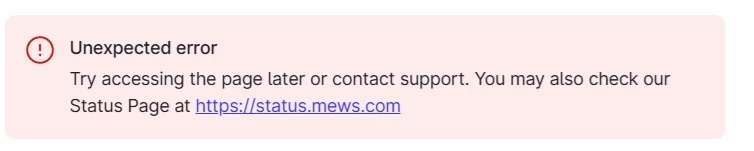
upon ‘override price’, I very often get the following error message.
very annoying, as it does seem the price is adjusted (or is it?)


anyone else in this situation?


Johannes Rott
Superstar Guru
Forum|alt.badge.img+1
  • Superstar Guru
  • October 31, 2025

Hi ​@PHman88 it is definitly a better version as before! the listened to our feedback.

i used it on three different properties last day, but haven´t seen the error message once. so we are not facing that situation.


nnica
  • Senior Contributor
  • October 31, 2025

latest version seems to incorporate all our input - so thanks a lot for that!

upon ‘override price’, I very often get the following error message.
very annoying, as it does seem the price is adjusted (or is it?)


anyone else in this situation?


There is no issue there. This message only comes up after you updated the last date on the interval of the calendar dates you selected. In the previous version before the update if you recall the sidebar closed. In the updated version it does not. I am sure they will come up with an update for the system so that when the last dates rate is updated in the selected interval to close the ‘pop up’ window and then you won’t see that message. Basically there is no new date to jump to and that is why it shows an error message. The rate change for the last date still goes through though. I hope my explanation makes sense :)


Forum|alt.badge.img
  • Author
  • Helper
  • October 31, 2025

latest version seems to incorporate all our input - so thanks a lot for that!

upon ‘override price’, I very often get the following error message.
very annoying, as it does seem the price is adjusted (or is it?)


anyone else in this situation?


There is no issue there. This message only comes up after you updated the last date on the interval of the calendar dates you selected. In the previous version before the update if you recall the sidebar closed. In the updated version it does not. I am sure they will come up with an update for the system so that when the last dates rate is updated in the selected interval to close the ‘pop up’ window and then you won’t see that message. Basically there is no new date to jump to and that is why it shows an error message. The rate change for the last date still goes through though. I hope my explanation makes sense :)


it does; thank you!


nnica
  • Senior Contributor
  • November 5, 2025

latest version seems to incorporate all our input - so thanks a lot for that!

upon ‘override price’, I very often get the following error message.
very annoying, as it does seem the price is adjusted (or is it?)


anyone else in this situation?


There is no issue there. This message only comes up after you updated the last date on the interval of the calendar dates you selected. In the previous version before the update if you recall the sidebar closed. In the updated version it does not. I am sure they will come up with an update for the system so that when the last dates rate is updated in the selected interval to close the ‘pop up’ window and then you won’t see that message. Basically there is no new date to jump to and that is why it shows an error message. The rate change for the last date still goes through though. I hope my explanation makes sense :)


it does; thank you!

Hi There,


Just an update, Mews I guess sow our comments as this issue is now solved. No more error message on the last date rate update :)


Johannes Rott
Superstar Guru
Forum|alt.badge.img+1
  • Superstar Guru
  • November 5, 2025

@PHman88 perfect