Question

Product Checklist grouping/filtering

  • August 3, 2026
  • 3 replies
  • 59 views

SonnenscheinHotel

Hello community!

We are currently struggling a bit adapting to MEWS coming from the old HS3. Our staff is a bit old-fashioned when it comes to lists like the breakfast list. We used to print it out in our old system the night before for the staff to look at it in the morning. Now we basically need a digitalized version; all the printable versions don’t work as intended, in my opinion. An example is filtering the reservation report, but these filters will never show up in the actual printable PDF, which seems like a bug? 
So we tried out having the product checklist open on an iPad for our ladies to check in the morning. For some reason, though, it lacks the ability to show the group as well. It only shows the guest and, at least for us, a redundant item “owner.” We would like to see the actual group there as well so we know which tables will be sitting together. It is possible to individually click on each guest to show in which group he/she belongs , but this is tedious for any larger amount of guests and visually exhausting. Could we please have a simple “group” row option for the product checklist? Thank you

3 Replies

Johannes Rott
Community Luminary
Forum|alt.badge.img+2
  • Community Luminary
  • August 4, 2026

Guten Morgen!

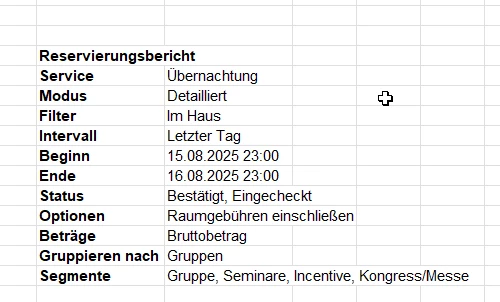
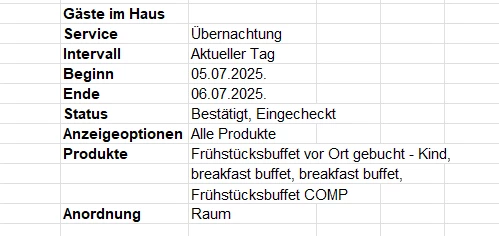
wir nutzen die Checkliste für Individuelle Gäste und bei größeren Gruppen ziehen wir einen Reservierungsbericht mit folgenden Filtern. Vielleicht hilft euch dies!

(So bestände auch die Möglichkeit - eine Papierliste zu ziehen)

Achtung beides wird in Excel exportiert und dann noch entsprechend angepasst.  natürlich müssen eure Produkte etc. ausgewählt werden.


Bei Fragen gerne melden!


SonnenscheinHotel

Danke für die schnelle Antwort. 
Es ist zwar so möglich, aber sehr umständlich. Eine Frühstücksliste mit Gruppierungen sollte wirklich ein Basis-Feature sein. Das war im alten Programm wirklich nur ein Tastendruck zum Drucken, nun sollen wir verschiedene Listen in Excel exportieren und dann noch manuell bearbeiten… ne, das geht nicht, vor allem die Chefin bei uns ist schon etwas älter und kann da nicht abends nach langen Tagen noch in Excel hantieren. 
Der Reservierungsbericht an sich mit gut eingestellten Filtern wäre ja tatsächlich schon nutzbar (Die Filter könnte ich als benutzerdefinierten Link in Mews hinterlegen) ABER diese Filter werden in der Druckversion nicht übernommen. Das ist leider ein eindeutiger Bug. 
 

Hier als Beispiel, wie die Liste ausgedruckt werden würde. Da stehen alle möglichen Informationen wie Kreditkarte dabei, die nicht als Filter ausgewählt sind und im Browser nicht angezeigt werden. Sobald man aber auf PDF drucken geht, werden wieder alle Filter angezeigt. 

Entweder das muss gefixed werden oder wenigstens eine gruppierung nach Gruppe in der Product Checklise als Filter möglich sein.

English: 

Thanks for the quick reply.
While it is possible to do it this way, it’s very cumbersome. A breakfast list with grouping options really ought to be a standard feature. In the old system, printing took just a single input; now we’re expected to export various lists to Excel and then edit them manually... that just won't work—especially since our manager is a bit older and shouldn't have to fumble with Excel in the evening every day.
The reservation report itself—if the filters were set up correctly - would actually be usable (I could even save the filters as a custom link in Mews), BUT those filters aren't carried over to the print version unfortunately. That is clearly unintended.

Above is a screenshot example of how the list prints out. It includes all sorts of information—like credit card details—that weren't selected in the filters and aren't visible in the browser view. However, as soon as you select "Print to PDF," all the filters reappear.

Either this needs to be fixed, or at least it should be possible to group by "Group" within the Product Checklist filter options.


Johannes Rott
Community Luminary
Forum|alt.badge.img+2
  • Community Luminary
  • August 4, 2026

@SonnenscheinHotel ja leider gibt es nicht die “eine” Toplösung nur verschiedene Wege nach Rom.

Bei uns bereitet dies der Nachtdienst vor und übergibt es wenn nötig ans Frühstückspersonal.