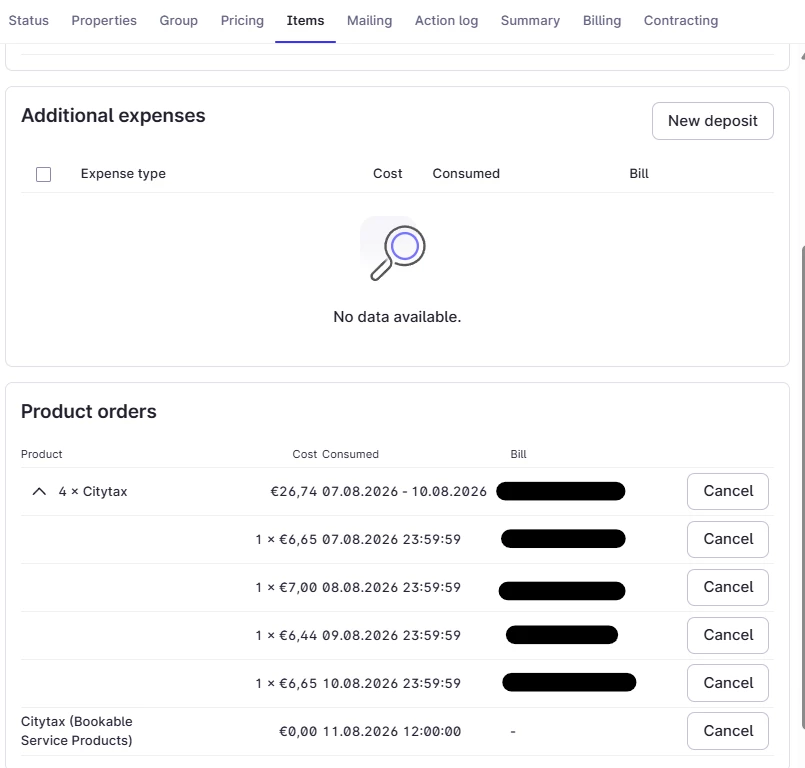
I can't seem to find an option to delete multiple items from a bill at once. Does anyone know the best way to do this?
For example, we sometimes have bookings where a guest stays for a week, but tourist tax doesn't apply to that guest. At the moment, we have to remove the tourist tax night by night, which is very time-consuming.
Is there a faster way to handle this?
Thanks in advance for any advice!
Kind regards,
Daniël Grit
Flonk Hotels
Best answer by Louisa Ruhrberg
Hi @Daniël Grit,
i guess you know at check-in time if the guest has to pay city tax or not, right? If so, you can delete the whole product “city tax” for each night by one click or night by night within the reservation. If you click on the “cancel” button next to the consumed dates “07.08.2026. - 10.08.2026”, you cancel all of them at once. If you click on the other “cancel” buttons below that one, you can delete the city tax per night.
But this you can only use if the bill is no closed yet.
i guess you know at check-in time if the guest has to pay city tax or not, right? If so, you can delete the whole product “city tax” for each night by one click or night by night within the reservation. If you click on the “cancel” button next to the consumed dates “07.08.2026. - 10.08.2026”, you cancel all of them at once. If you click on the other “cancel” buttons below that one, you can delete the city tax per night.
But this you can only use if the bill is no closed yet.
Welcome Mews customers. Please use the same email address for registration as in your Mews account. By doing so we can help you faster if we might need to check something in your account.