



Google Ads can generate demand—but it’s hard to prove what that demand is worth when your ad data lives in one place and your hotel performance data lives somewhere else.
With the Google Ads integration in Mews Business Intelligence (Mews BI), you can bring Google Ads metrics into Mews BI and analyze them alongside hotel outcomes like Booked Rooms, Total Operating Revenue, and Marketing Revenue – so you can make smarter, faster decisions about where to invest (and what to stop).
What you can do with it
Here are a few practical ways customers use the Google Ads dashboard once it’s connected:
1) Prove marketing impact in commercial terms (not vanity metrics)
Move beyond clicks and impressions by tracking ROAS and MER against real hotel performance—ideal for reporting to owners, GMs, or finance with confidence.
2) Spot wasted spend faster
Use CPA, CTR, CPC/CPM, and conversions to quickly identify campaigns that look busy but aren’t contributing meaningful outcomes—then reallocate budget to what performs.
3) Optimize campaigns around the stay, not just the click
The dashboard separates Pickup Period (ad activity) and Check-in Period (hotel outcomes), so you can see how campaigns are supporting upcoming stays—not just generating immediate traffic.
4) Run multi-property marketing with clarity (especially for shared campaigns)
For groups running regional or brand campaigns, campaign mapping (including weighted allocation) makes it possible to understand performance at a property level—without messy spreadsheets or guesswork.
5) Get a single source of truth for weekly performance reviews
Instead of exporting from Google Ads and stitching data together manually, teams can use the Google Ads Marketing dashboard as a consistent view for recurring commercial meetings.
What you’ll get
Once connected, Mews BI will:
-
Deploy a Google Ads Marketing dashboard in Mews BI
-
Ingest up to 6 months of historical Google Ads data (may take a few hours)
-
Refresh data nightly for the previous day (today’s data appears tomorrow)
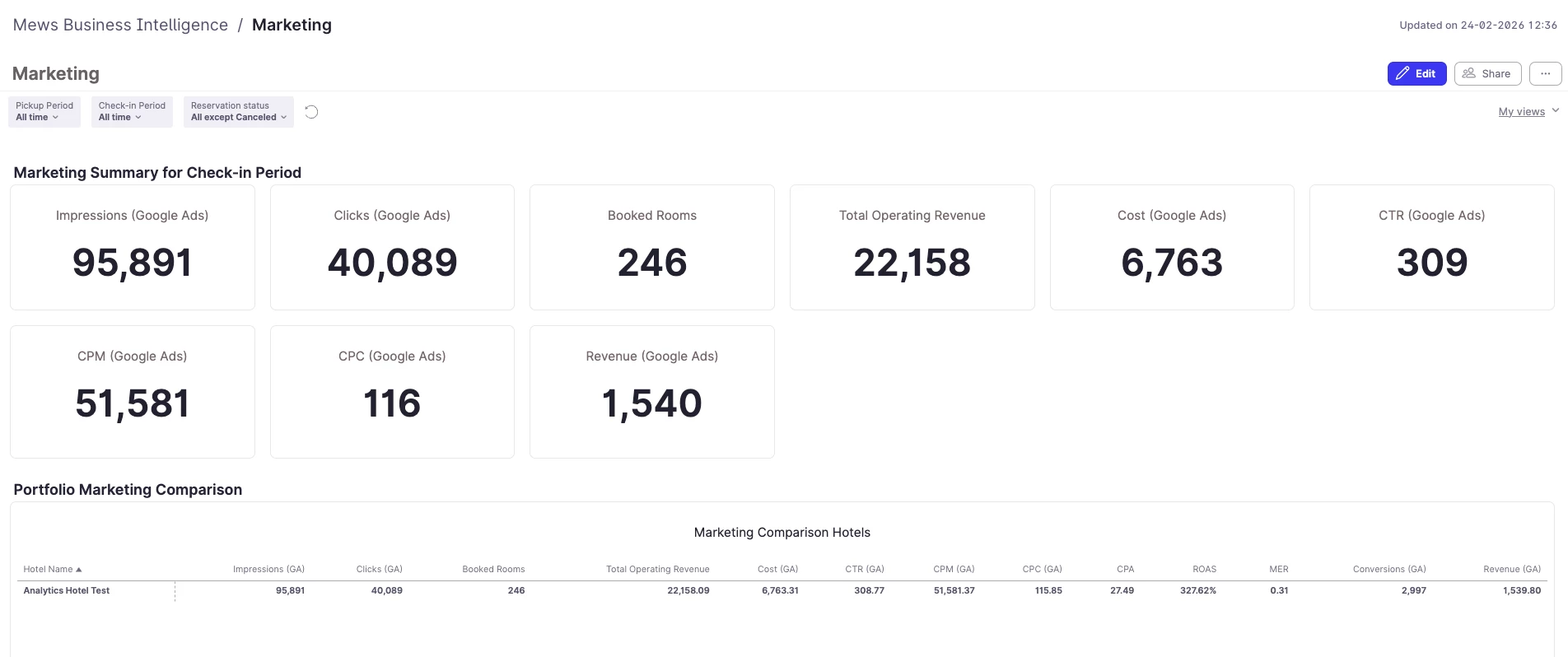
(example of how the Google Ads dashboard looks)
Where to find the connector
Go to Mews BI Settings → Data connectors, then select Google Ads.
Next step
If you’re ready to connect the dots between ad spend and hotel outcomes, the Google Ads integration is a great place to start—especially for teams managing multiple properties or running shared campaigns.
Head to the Google Ads connector help guide to learn how to connect your account, set up campaign mapping, and get the most from the dashboard metrics.
Try Mews BI today!
Here's how to get started with Mews BI:
-
Enable Mews BI and set up your users and properties
-
Once you join the Mews BI beta, it will replace Mews Analytics in your PMS. But you can bring it back anytime via the toggle on the dashboard.