

Use of the Guest In-House Report

  • February 3, 2026
  • 16 replies
  • 94 views

Robin Gustavsson
Senior Guru
Forum|alt.badge.img+2

Hello everyone,
 

I would like to better understand how the Guest In-House report is intended to be used.
 

It has been brought to our attention that the Guest In-House report does not reflect all reservations that are actually in-house at a given moment. For example, the report does not include reservations that checked in earlier than the standard check-in time; these reservations only appear after the standard check-in time has passed. In addition, the report does not include reservations that are staying multiple nights and checked in yesterday or on a prior date.
 

This functionality is not made very clear by Mews. If I were unaware of these limitations, the Guest In-House report would be the first report I would generate and provide to emergency services in the event of a fire or similar incident - assuming it accurately reflected all guests currently on property.
 

Given these limitations, I’m curious to understand how others are using this report at their properties:

  • In what situations do you rely on the Guest In-House report?

  • Were you aware that this report does not show all reservations currently in-house?
     

Thank you in advance for sharing your insights.

16 Replies


Hi Robin, 

If what you a writing is correct then this would defently be an issue, as we use this as our main emergency report. 


I just check in my system, and I see guest that has allready check in early today is on the list as well as stayovers. 


In your case is this that it is just some of them missing, or is everyone missing? (I have not dobbel checked every singel reservation, just a couple of testst)


Have a great day!

Vegard, GM, Smarthotel Oslo


Sylvain.Attou
Forum|alt.badge.img

Hi Robin,

Thank you for the development and work on the Guest In-House Report.

The main purpose of this report, in my view, is safety. In this context, it seems essential that the default settings include all bookable services.

In our property, we have three types of bookable services: daily, nightly, and monthly. Each of these services accommodates guests in our different spaces. Therefore, the Guest In-House Report should allow a view of all these services at a glance.
Having to select services one by one in an emergency could lead to oversights, with potentially serious consequences for both guest and staff safety.

I remain available for any further discussion or clarification on this matter.

Thank you again for your work.

Sylvain


Tobias Sörling
Forum|alt.badge.img


Hi Robin, 

If what you a writing is correct then this would defently be an issue, as we use this as our main emergency report. 


I just check in my system, and I see guest that has allready check in early today is on the list as well as stayovers. 


In your case is this that it is just some of them missing, or is everyone missing? (I have not dobbel checked every singel reservation, just a couple of testst)


Have a great day!

Vegard, GM, Smarthotel Oslo

Hello Vegard, 

I would like to know when is you default check-in time. As Robin mention before. If you i.e. have an early check-in at say 11 a.m. and you default check-in time is set to be 3 p.m. 

The early check-in will not show on the Guest In-House list unfortunately.


Have a blast! 


Robin Gustavsson
Senior Guru
Forum|alt.badge.img+2

Hello,

I brought this up with Mews, as I see this as a major security risk.
The Mews support representative initially recommended using the Reservation Overview; however, this cannot be printed, and when exported, it only shows a total. They later revised their recommendation and advised us to use the Reservation Report with the “staying” filter instead.

I do not see the point of a guest in-house report if it does not quickly provide exactly that - guests currently in house.


See the response from support below:


Forum|alt.badge.img

Hi Robin

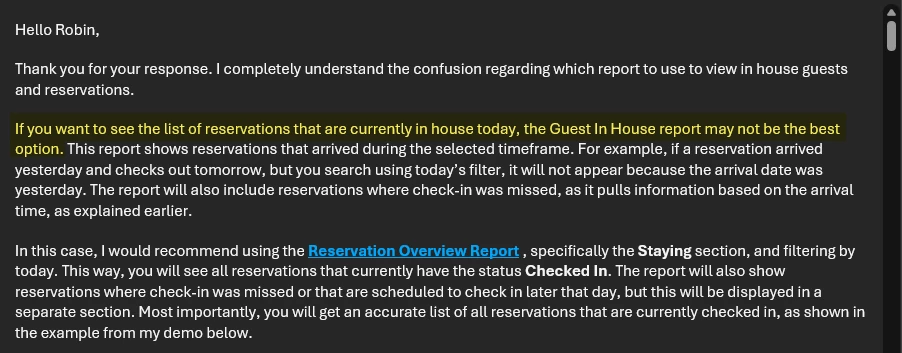
From what you’re describing, I think there may be a bug in your guests in-house report. When I go into the report, by default the settings are: -

  • Start: current date and time
  • End: current date and time (i.e. same as Start)
  • Status: checked in (i.e. will not show guests that have checked out, confirmed (i.e. due to arrive today) or optional bookings)

I’ve just run a guests in house report and it shows me the correct list of guests currently checked in. This is 12 guests broken down as follows: -

  • 2 guests that have checked in today. These also checked in early (i.e. before the Settings > Services > Stay > Reception)
  • 10 stay-overs, who have checked in at various dates including yesterday, the day before and earlier, and are also checking out on various dates including tomorrow and later

My point is that the default behaviour (i.e. not changing any settings) that I observe when generating the guests in-house report is that it does show guests that are currently checked in. We also run the report with the Status setting set to include both ‘Checked in’ and ‘Confirmed’ so that we can also see who is due to arrive.

I don’t know why Mews Support sent the response you screenshotted, as that doesn’t seem to reflect the purpose and behaviour of the guests in house report. If you’re running the report using the default settings and it’s not showing you a correct list of guests that are currently checked in, to me this sounds like a bug.

I hope this helps!


Sami


Svenja
Forum|alt.badge.img+2
  • Superstar Helper
  • February 3, 2026

The “Old Guest in house report” shows you only the checked in reservations at that moment. Unless you adjust the filters in a different way.

It’s intended for exactly that purpose, to be able to see exactly who is IN house, especially in case of emergency and evacuations.

The new one doesn’t do this quite so well yet.


Svenja
Forum|alt.badge.img+2
  • Superstar Helper
  • February 3, 2026

Hello,

I brought this up with Mews, as I see this as a major security risk.
The Mews support representative initially recommended using the Reservation Overview; however, this cannot be printed, and when exported, it only shows a total. They later revised their recommendation and advised us to use the Reservation Report with the “staying” filter instead.

I do not see the point of a guest in-house report if it does not quickly provide exactly that - guests currently in house.


See the response from support below:


That answer makes no sense at all, maybe they didn’t understand the question correctly?


Robin Gustavsson
Senior Guru
Forum|alt.badge.img+2

Hello,

I brought this up with Mews, as I see this as a major security risk.
The Mews support representative initially recommended using the Reservation Overview; however, this cannot be printed, and when exported, it only shows a total. They later revised their recommendation and advised us to use the Reservation Report with the “staying” filter instead.

I do not see the point of a guest in-house report if it does not quickly provide exactly that - guests currently in house.


See the response from support below:


That answer makes no sense at all, maybe they didn’t understand the question correctly?

I know, right! Trust me, there were many examples shared back and forth before this.


Tobias Sörling
Forum|alt.badge.img

Hi Sami, 
Here is one quick example on how the Guest inhouse list works for us.

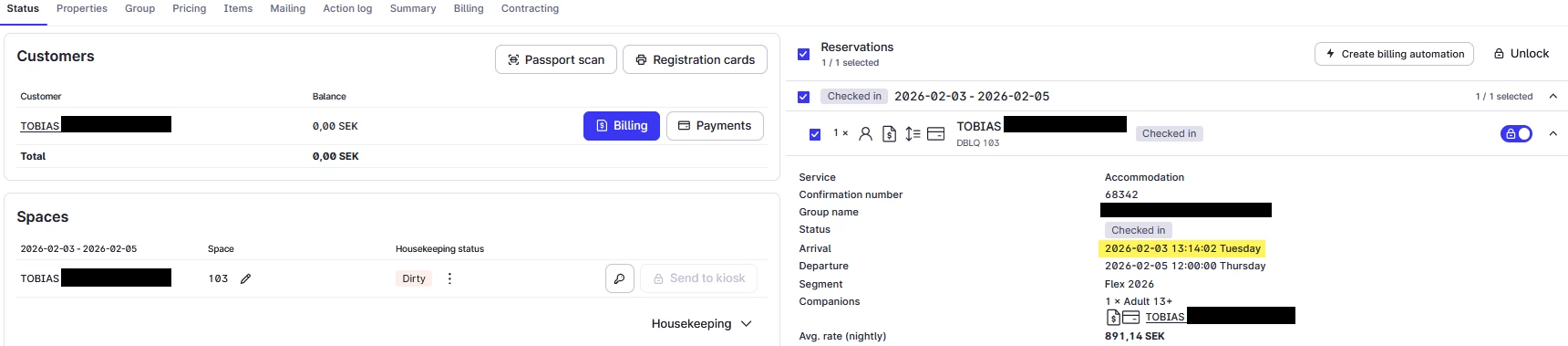
If I check a reservation that was checked-in today. 


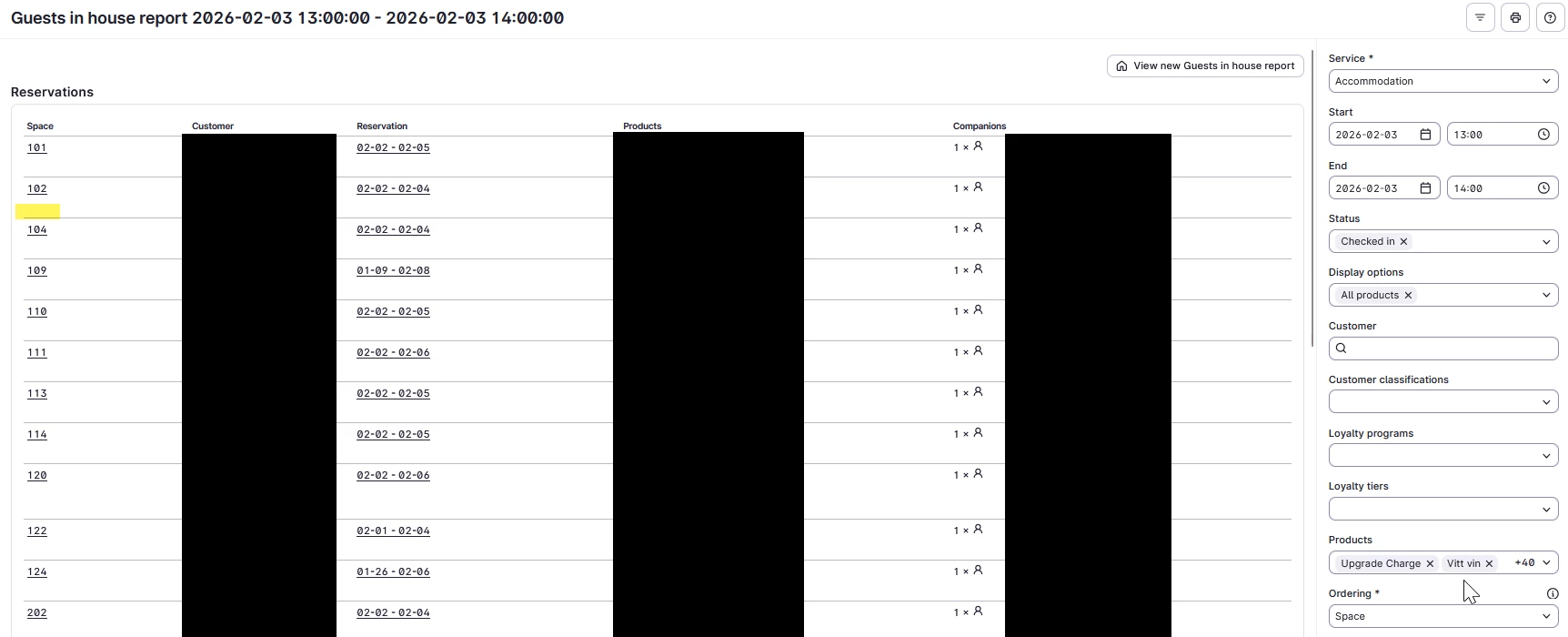
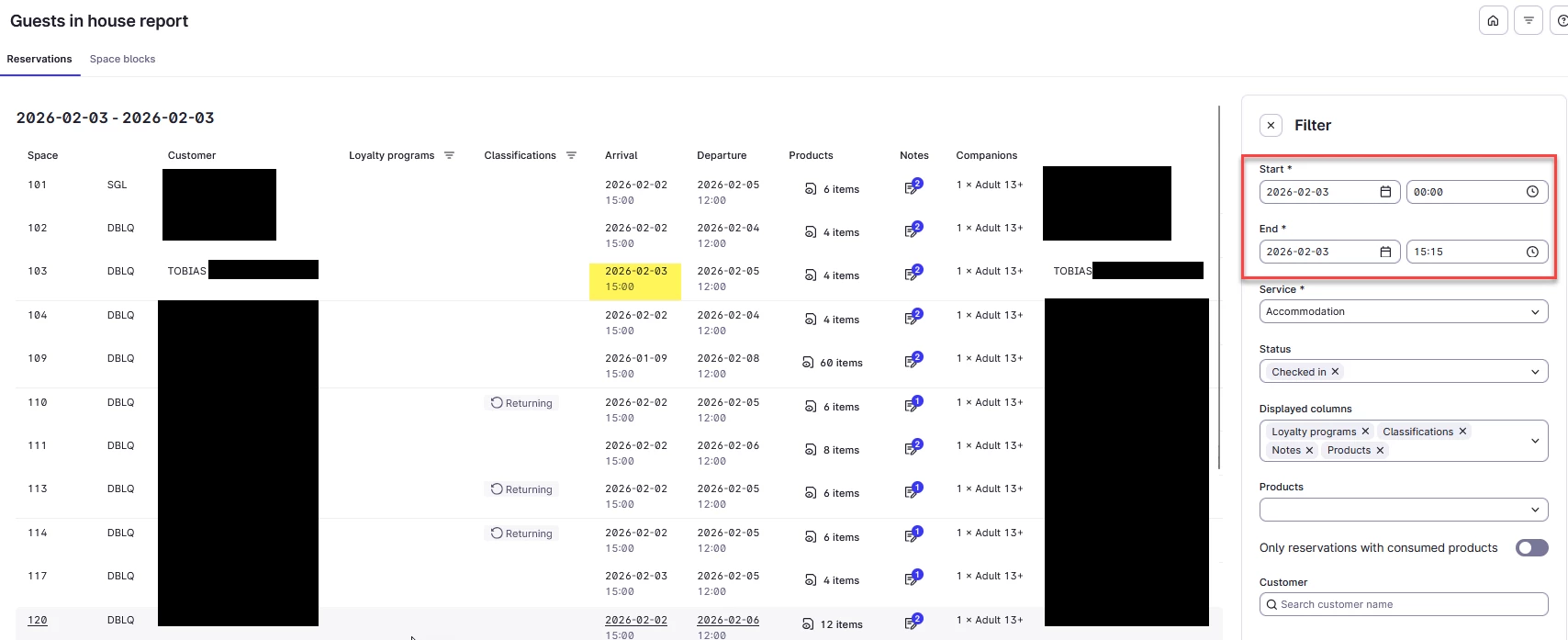
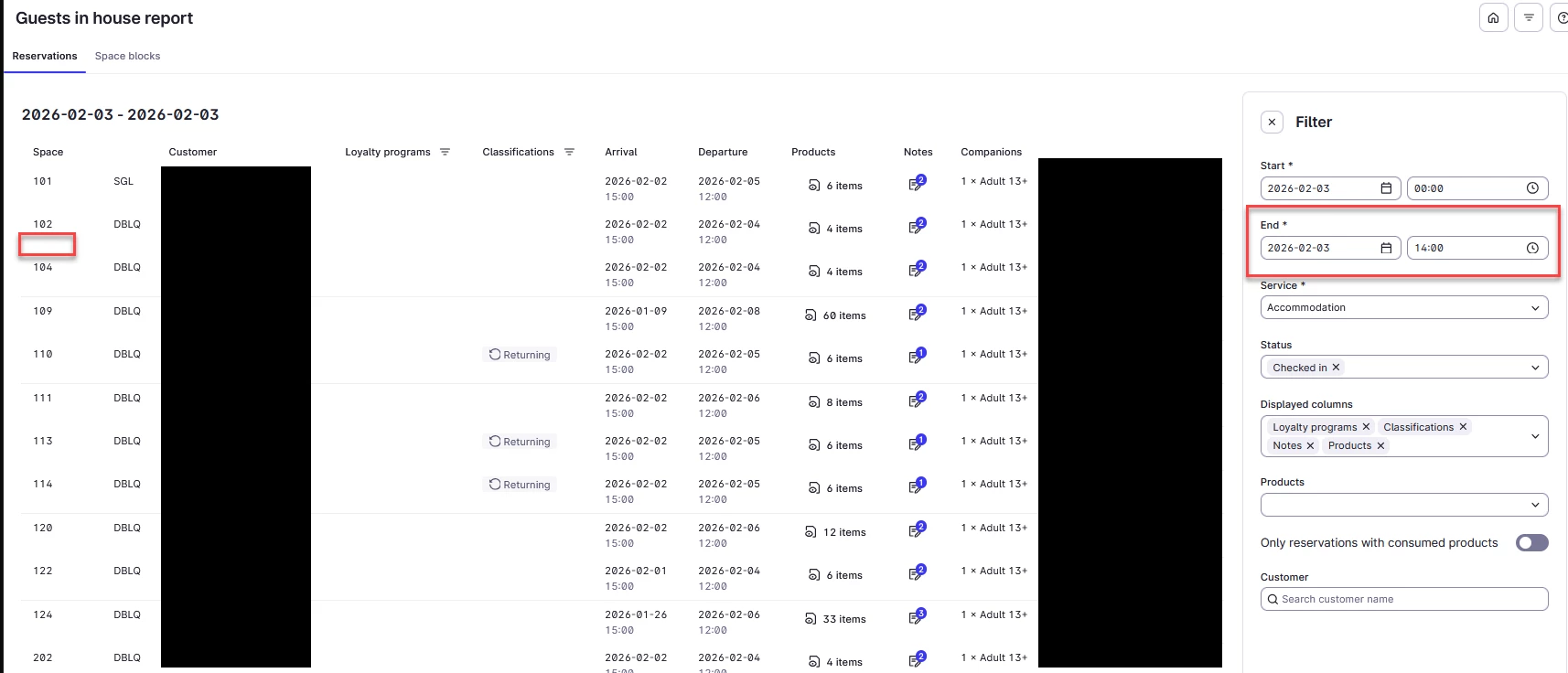
If I check the Guest In-House report between 13 - 14 today. I don’t see the reservation staying in room 103. As is clearly shown here : 


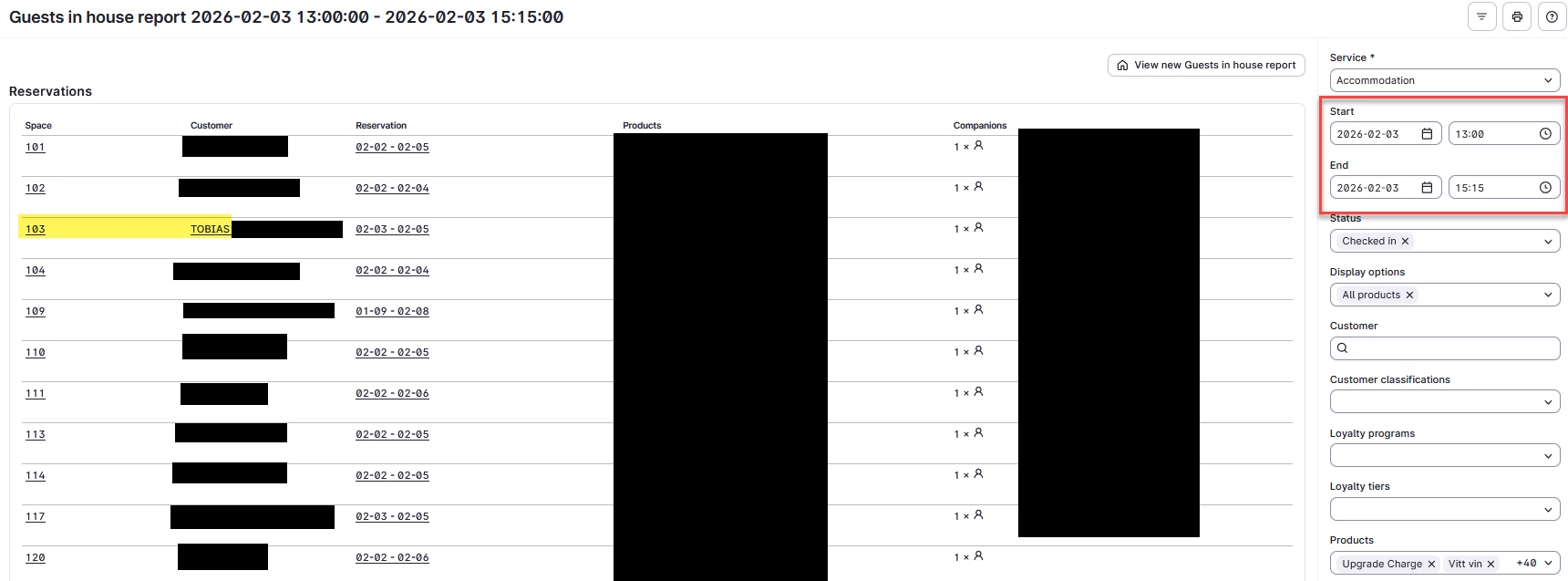
When I then enter a different time, lets say 15:15. (we have our standard check-in time at 15.00)

You will see that it shows up. 


I did even try to set it at 15:00 and it still didnt show up. So the time needs to be after. As it appears.

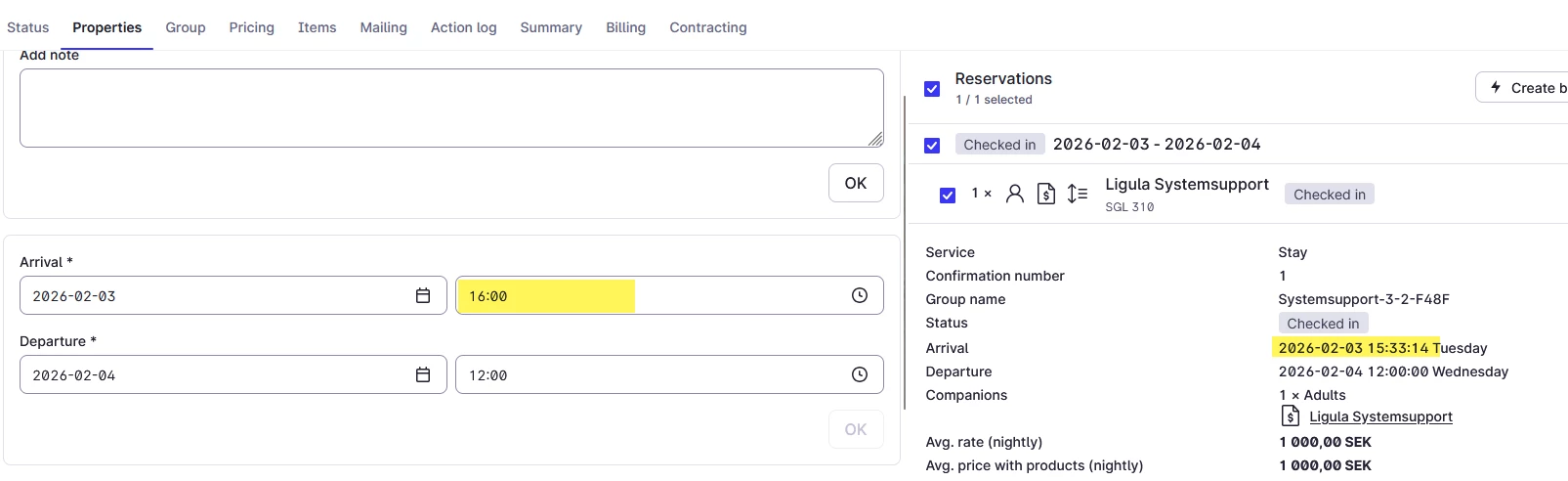
If I check the New Guest In-house list, we can clearly see that the “check-in” time of the guest is 15.00 and not 13:14:02 as it says in the reservations.


If I change the time here to be before 15:00 here as well, it will disappear again. 


I am guessing, the good thing the new report is that the end date is set to 00:00 next day as a default.

P.s. Sorry for the long post with a lots of pictures.


Tobias Sörling
Forum|alt.badge.img

The “Old Guest in house report” shows you only the checked in reservations at that moment. Unless you adjust the filters in a different way.

It’s intended for exactly that purpose, to be able to see exactly who is IN house, especially in case of emergency and evacuations.

The new one doesn’t do this quite so well yet.

See my previous post and see that this is not true :)


Robin Gustavsson
Senior Guru
Forum|alt.badge.img+2

Hi Robin

From what you’re describing, I think there may be a bug in your guests in-house report. When I go into the report, by default the settings are: -

  • Start: current date and time
  • End: current date and time (i.e. same as Start)
  • Status: checked in (i.e. will not show guests that have checked out, confirmed (i.e. due to arrive today) or optional bookings)

I’ve just run a guests in house report and it shows me the correct list of guests currently checked in. This is 12 guests broken down as follows: -

  • 2 guests that have checked in today. These also checked in early (i.e. before the Settings > Services > Stay > Reception)
  • 10 stay-overs, who have checked in at various dates including yesterday, the day before and earlier, and are also checking out on various dates including tomorrow and later

My point is that the default behaviour (i.e. not changing any settings) that I observe when generating the guests in-house report is that it does show guests that are currently checked in. We also run the report with the Status setting set to include both ‘Checked in’ and ‘Confirmed’ so that we can also see who is due to arrive.

I don’t know why Mews Support sent the response you screenshotted, as that doesn’t seem to reflect the purpose and behaviour of the guests in house report. If you’re running the report using the default settings and it’s not showing you a correct list of guests that are currently checked in, to me this sounds like a bug.

I hope this helps!


Sami

Hello,

Yes, I do not feel that what I am experiencing is the intended system behavior. However, after emailing back and forth with support, that was the answer I received.

Unfortunately, our standard check-in time (3 PM) just passed, so I cannot share any more examples from my live environment today. I did, however, try this in DEMO. I set my regular check-in time to 4 PM.

What happens when reservations are checked in before 4 PM is that the arrival time updates on the right-hand side of the screenshot below, but the arrival time under “Properties” remains at 4 PM. Because of this, the Guest In-House report will not show the reservation until after 4 PM has passed, even though the reservation is checked in.


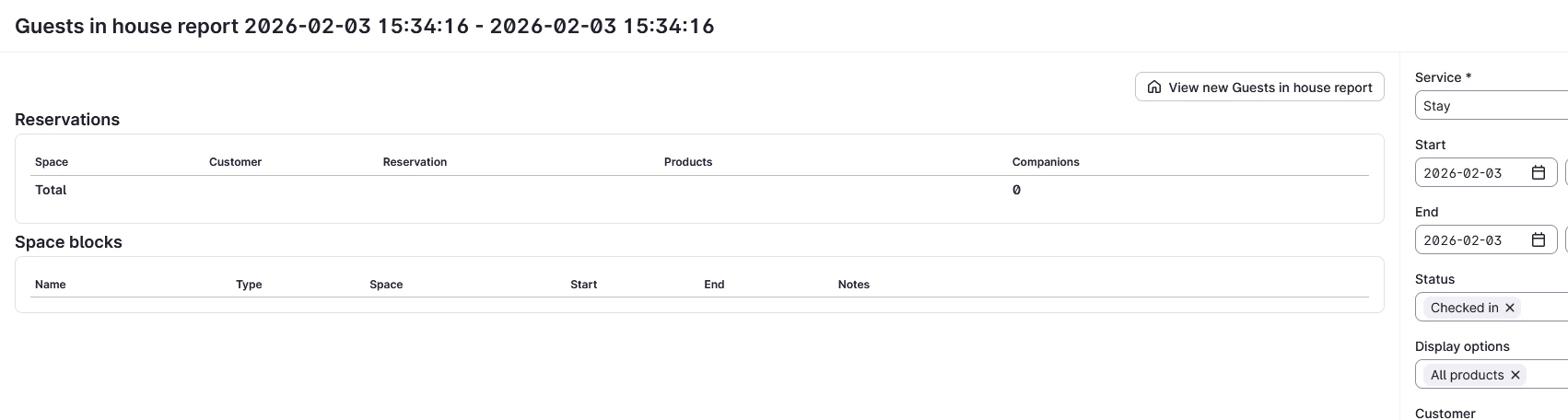
Without changing any filters, the Guest In-House report does not show early check-ins as checked in if the report is generated before 3 PM, regardless of the end date I set. After 3 PM, all of my early check-ins for today appear on the report.

With this filtering, I would assume that I should see all guests that are in-house at this current moment in time (2026-02-03 15:34:16).

The ticket with Mews was created before Mews released the New Guest-In-House report. In the new report, I can see, by default, filters for a 24-hour period.

I will have to revisit this tomorrow and do some testing in my live environment. The response from Mews support previously shared only made me more confused and did not make sense.


Svenja
Forum|alt.badge.img+2
  • Superstar Helper
  • February 3, 2026

Okay that must be a bug because that way none of those reports or at least the filter “checked in” in any of the reports would make any sense. That’s a major issue that needs to be fixed.

I tried around in demo as well, also with late departures and other reports (space report and the customer report) and the only way to get accurate data is the old guest in house report with the entire calendar day as a filter (3rd feb 00:00 - 4th feb 00:00) with only “checked in” as the status filter.

I had extensive call about the Guest in house report with Mews already as I think that the guest in house report should display the “Disabled” classification icon next to the name, but not all the other icons as they are irrelevant in case of emergency, but so far I can only filter for just the disabled but then I am missing everyone else.

But at least so far the checked in filter worked or at least I’ve been under the impression that it worked for the past 9 years so I’d find it really surprising if this was actually expected system behaviour. 


Robin Gustavsson
Senior Guru
Forum|alt.badge.img+2

 and the only way to get accurate data is the old guest in house report with the entire calendar day as a filter (3rd feb 00:00 - 4th feb 00:00) with only “checked in” as the status filter.


@Svenja Can you please try tomorrow morning to check in a reservation arriving that day and let me know if you see the reservation marked as checked in on your report?

I do not see any early check-ins on my report, regardless of how I filter it.
 

+Good point about accessibility notes - very important guest information! What did Mews respond regarding that?


Robin Gustavsson
Senior Guru
Forum|alt.badge.img+2

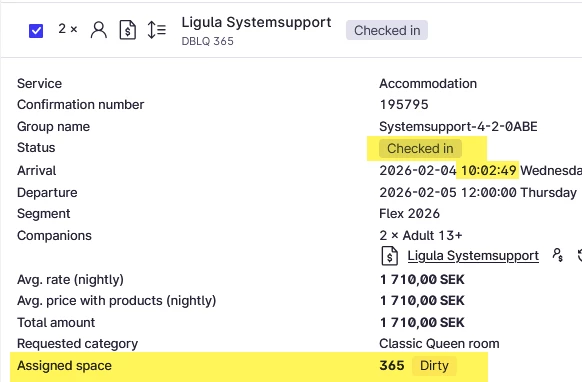
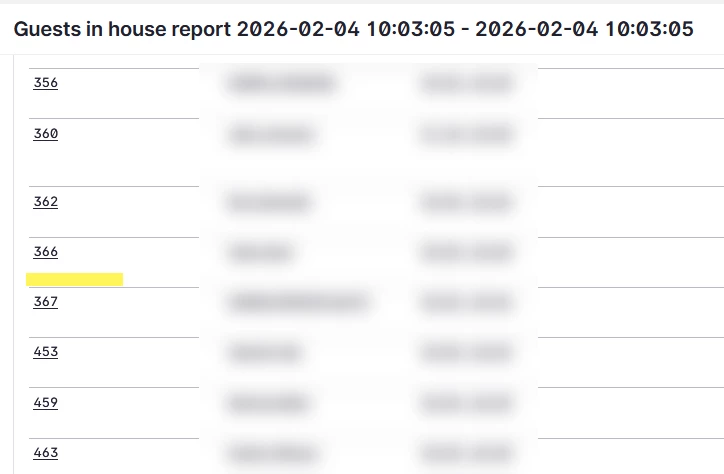
I tried this again today in my live environment.

After checking in a reservation early, the reservation does not appear at all in the old Guest In-House report, regardless of how I set the filters.


Room 365 not showing


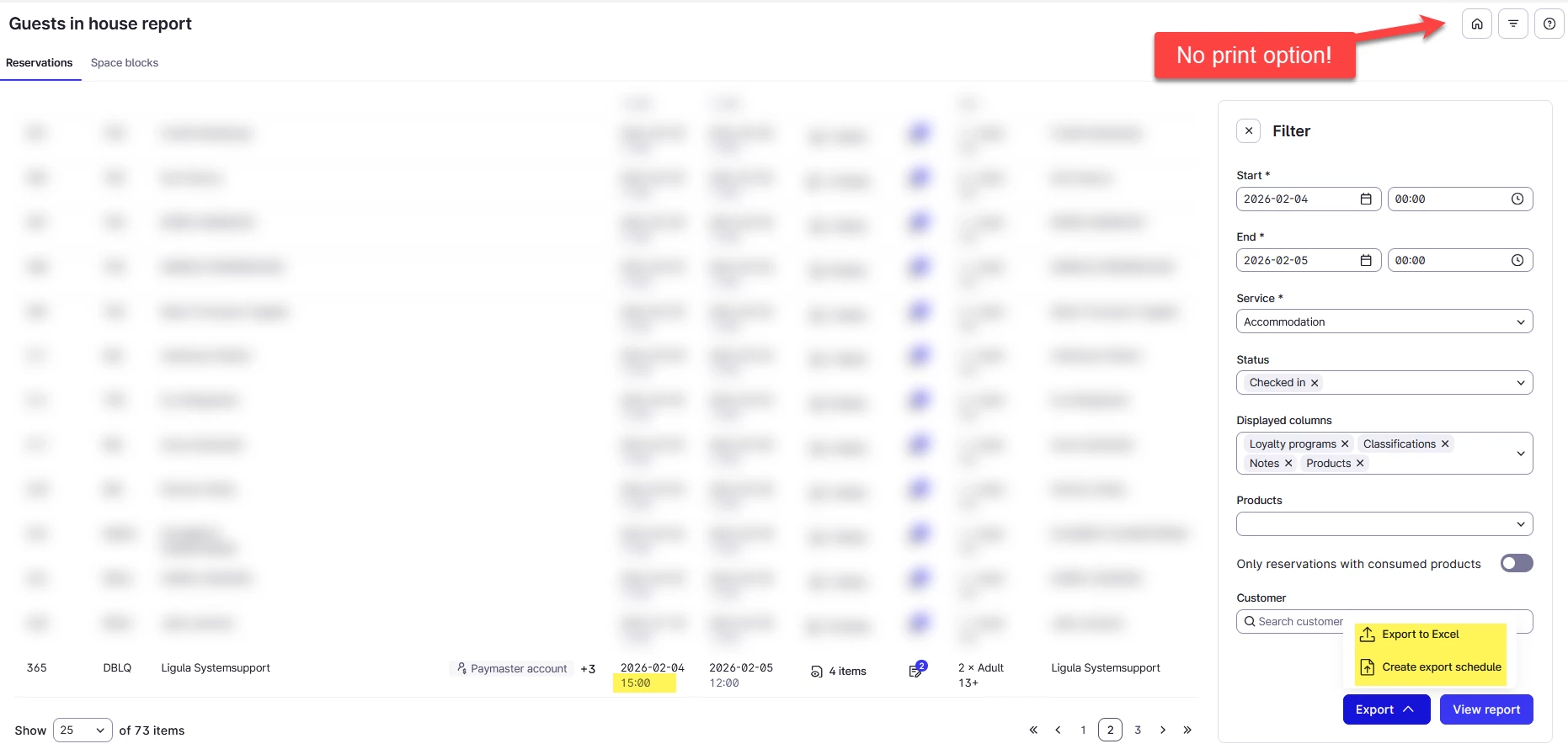
The new Guest In-House report does display the reservation, but I have some concerns:

  • The report shows the default check-in time rather than the actual time the reservation was checked in.

  • I am not a fan of the multi-page format, as it, in my opinion, does not provide a clear overview.

  • Most critically, the new report cannot be printed (!).


Svenja
Forum|alt.badge.img+2
  • Superstar Helper
  • February 4, 2026

 and the only way to get accurate data is the old guest in house report with the entire calendar day as a filter (3rd feb 00:00 - 4th feb 00:00) with only “checked in” as the status filter.


@Svenja Can you please try tomorrow morning to check in a reservation arriving that day and let me know if you see the reservation marked as checked in on your report?

I do not see any early check-ins on my report, regardless of how I filter it.
 

+Good point about accessibility notes - very important guest information! What did Mews respond regarding that?


@Robin Gustavsson  You mean, someone checked in earlier than standard check-in time? That worked for me as long as I have the entire day 00:00-00:00 h in the filter.


Robin Gustavsson
Senior Guru
Forum|alt.badge.img+2

 and the only way to get accurate data is the old guest in house report with the entire calendar day as a filter (3rd feb 00:00 - 4th feb 00:00) with only “checked in” as the status filter.


@Svenja Can you please try tomorrow morning to check in a reservation arriving that day and let me know if you see the reservation marked as checked in on your report?

I do not see any early check-ins on my report, regardless of how I filter it.
 

+Good point about accessibility notes - very important guest information! What did Mews respond regarding that?


@Robin Gustavsson  You mean, someone checked in earlier than standard check-in time? That worked for me as long as I have the entire day 00:00-00:00 h in the filter.

Yes, exactly that!

I can now see the reservation on the old report with the 24-hour filter. I can also see reservations that are still staying but were checked in on prior days -  completely opposite of what support told me in the email conversation. This is exactly how I intended the report to work, but it hasn’t functioned this way for me until now.

However, the filter should, by default, be set to 24 hours for the old report as well. Hopefully, someone at Mews sees this conversation and can make that adjustment.