Solved

Show the room price in confirmation emails with multiple rooms

  • February 17, 2026
  • 3 replies
  • 70 views

Forum|alt.badge.img+1

Hi Community!

We are struggling a bit with the new email templates, specifically the price per room.


Mews loops through the reservations in the confirmation email, and displays the info for each reservation. But does not show the price. The price is only shown in a summary at the bottom.
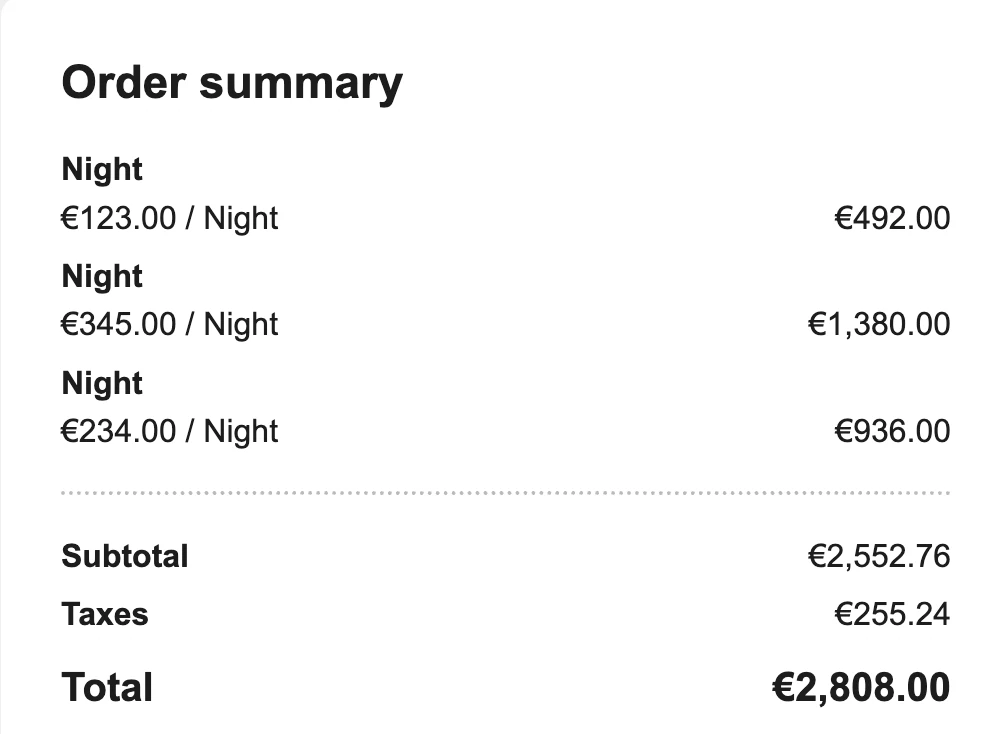
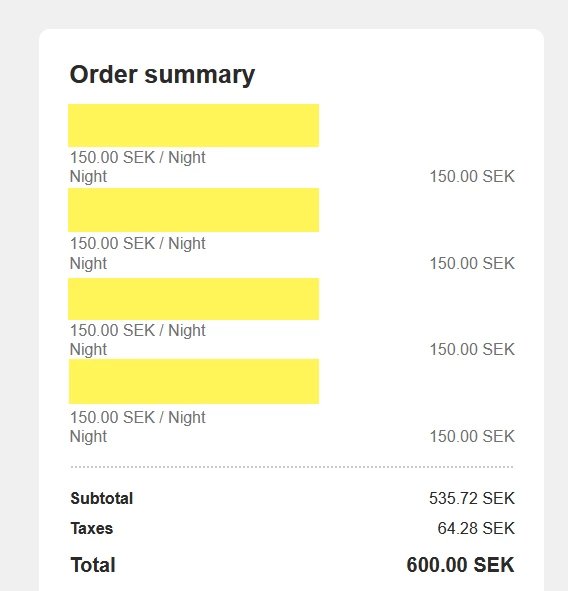
For us, this summary shows up as:


This makes it impossible for the guest to figure out to which room the price belongs. 


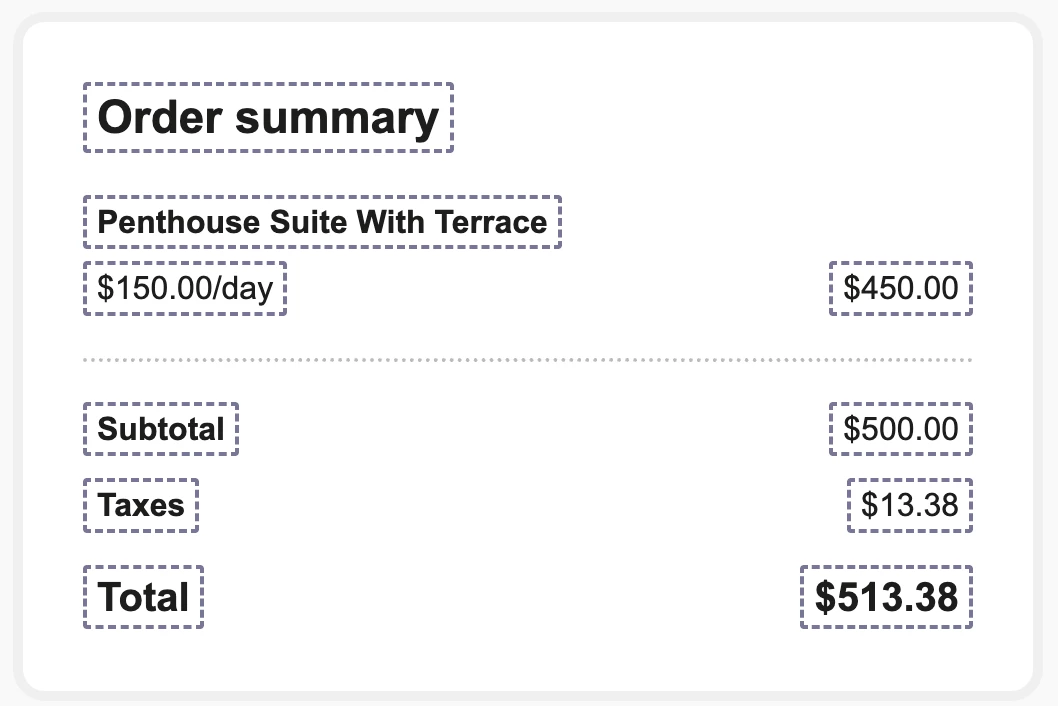
However, in the example text, in the mail editor, the merge tag show the name of the room above each charge. 


Is that just misleading, or does that actually work for other properties? Are we doing something wrong..?


Or does anyone perhaps have another solution to show the costs per room type booked?


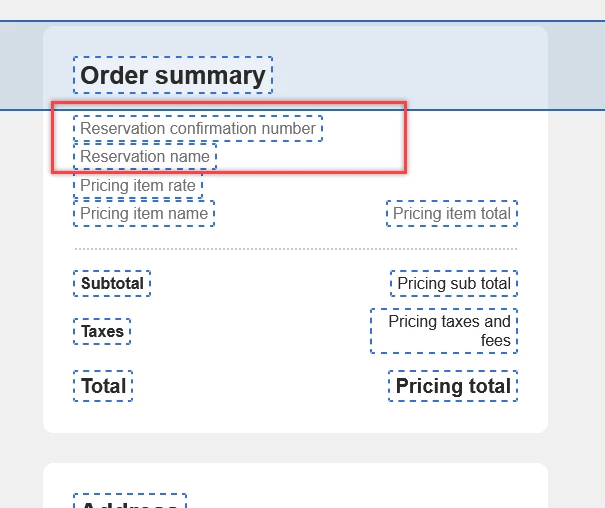
We’ve tried adding the pricing item total to the reservation loop, but it doesn’t accept that.
We also tried to start a reservation and pricing item loop at the same time, but also no luck :) 

Best answer by josue.orellana

Hello ​@andreas

I’m Josue - one of the Community Ambassadors - and I’m happy to help clarify your question regarding the email editor. 

What you’re seeing is actually a limitation of how the new email templates handle the Order summary, not something you’re setting up incorrectly.

In the editor preview, the example block (with “Penthouse Suite with Terrace”, day rate, and a total) is filled with static demo data which is only displaying data in a one-room example. 

In the real confirmation email (your first screenshot), the Order summary at the bottom is calculated at trip level and is displaying data in a multi-room example. It groups all “Night” charges for the whole trip and shows them as separate line items (Night + rate + total), and then adds the subtotal, taxes, and total. At the moment, this summary block:

  • does not know which specific room each “Night” line belongs to, and

  • cannot add the room / reservation reference next to each line.

In an internal case I recently handled about the confirmation template, I confirmed that the Order summary is built using a pricing loop (for example, over pricing.lineItems) that groups charges by type and shows totals, but it still works at summary level, not per room.

There is no supported way today to make the bottom Order summary show “one price block per room with the room name above it” for multi‑room stays. This has already been raised with our Guest Journey (GX) team, and there is work in the backlog to improve how the summary behaves for group/multi‑room bookings, but it isn’t available yet.

I’ve passed this use‑case on to our product team (alongside similar feedback from other properties) so your scenario is included as we iterate on the Order summary behaviour for multi‑room stays.

If you have any questions, please don’t hesitate to let me know! 😎

~ Best regards, 

3 Replies

Robin Gustavsson
Mentor
Forum|alt.badge.img+4

Hello,

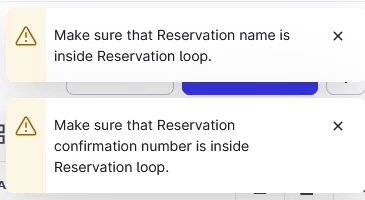
I have run some tests, and I am also receiving notifications that the reservation tags should only be used within the reservation loop.


In the actual email, the tags only create some extra blank space.


josue.orellana
Community Ambassador
Forum|alt.badge.img+1
  • Community Ambassador
  • Answer
  • February 23, 2026

Hello ​@andreas

I’m Josue - one of the Community Ambassadors - and I’m happy to help clarify your question regarding the email editor. 

What you’re seeing is actually a limitation of how the new email templates handle the Order summary, not something you’re setting up incorrectly.

In the editor preview, the example block (with “Penthouse Suite with Terrace”, day rate, and a total) is filled with static demo data which is only displaying data in a one-room example. 

In the real confirmation email (your first screenshot), the Order summary at the bottom is calculated at trip level and is displaying data in a multi-room example. It groups all “Night” charges for the whole trip and shows them as separate line items (Night + rate + total), and then adds the subtotal, taxes, and total. At the moment, this summary block:

  • does not know which specific room each “Night” line belongs to, and

  • cannot add the room / reservation reference next to each line.

In an internal case I recently handled about the confirmation template, I confirmed that the Order summary is built using a pricing loop (for example, over pricing.lineItems) that groups charges by type and shows totals, but it still works at summary level, not per room.

There is no supported way today to make the bottom Order summary show “one price block per room with the room name above it” for multi‑room stays. This has already been raised with our Guest Journey (GX) team, and there is work in the backlog to improve how the summary behaves for group/multi‑room bookings, but it isn’t available yet.

I’ve passed this use‑case on to our product team (alongside similar feedback from other properties) so your scenario is included as we iterate on the Order summary behaviour for multi‑room stays.

If you have any questions, please don’t hesitate to let me know! 😎

~ Best regards, 


Forum|alt.badge.img+1
  • Author
  • Rising Star
  • February 26, 2026

@josue.orellana Thanks for the clear answer, I’m happy to hear it’s being worked on!