



How to Use Peppol ID in Mews for Belgium (incl. GLN)
This article explains what the Peppol ID is, when Belgian hotels should (and should not) use it, how it relates to VAT/KBO, and how to configure it correctly in Mews, including support for GLN (0088:…).
What is the Peppol ID?
The Peppol ID is the address used to deliver your e‑invoice XML inside the Peppol network.
Think of it like this:
-
Tax/VAT (KBO) number
→ Legal company identifier that appears on the invoice. -
Peppol ID
→ Technical routing address used by Peppol to deliver the XML to the correct recipient.
For Belgian companies, Mews supports Peppol IDs in these formats:
0208:0123456789– Belgian company number (KBO/BCE)9925:be0123456789– Belgian VAT number (with BE prefix)0088:1548079098355– Global Location Number (GLN)
In many cases, your VAT/KBO number is enough.
In some setups, your customer or accounting system uses a different format (for example 9925:be0123456789 or 0088:1548079098355).
The Peppol ID allows you to support those cases.
What happens if we leave it empty?
If you do not fill in a Peppol ID, nothing changes for you:
- Mews continues to use your existing VAT/KBO to route invoices through Peppol.
- Invoices are sent and validated exactly as they are today.
- You remain compliant; you are not required to fill in this field.
If you are unsure what to enter, it is safe to leave the Peppol ID empty.
When should we use the Peppol ID?
Only use a Peppol ID when you receive a specific value from one of these parties:
- Your accountant or accounting software provider
- Your corporate customer or their finance/procurement team
- Another partner that clearly tells you:
> “Please use this Peppol ID for our invoices”
In that case:
- Keep your Tax/VAT (KBO) number as it is (still required on invoices).
- Enter the value they gave you as your Peppol ID in Mews (see configuration below).
Mews will then:
- Show the VAT/KBO on the invoice as the legal company ID.
- Use the Peppol ID only to decide where the XML is delivered in the Peppol network.
If both are present:
- VAT/KBO → legal details on the invoice
- Peppol ID → routing inside Peppol
How to configure Peppol ID in Mews (Belgium)
In Mews, the Peppol ID for a Belgian company is stored in the Additional tax identifier field on the company profile.
That same value is then shown as “Peppol ID” on the bill screen and in the Fiscal record report.
To configure it:
-
Open the company profile
Go to the company you invoice via Peppol (for example, a corporate customer or agency). -
Open the Fiscal section
In the company profile, scroll to the Fiscal block. -
Fill in the fiscal identifiers
- Tax identifier
- Enter the Belgian VAT/KBO number, for example:
BE0436781102. - This is the legal tax number that appears on the invoice.
- Enter the Belgian VAT/KBO number, for example:
- Additional tax identifier
- Enter the Peppol ID you received, for example:
0208:0123456789(KBO‑based Peppol ID), or9925:be0123456789(VAT‑based Peppol ID), or0088:1548079098355(GLN).
- This is the value Mews will use as the Peppol routing address.
- Enter the Peppol ID you received, for example:
- Tax identifier
-
Save the company
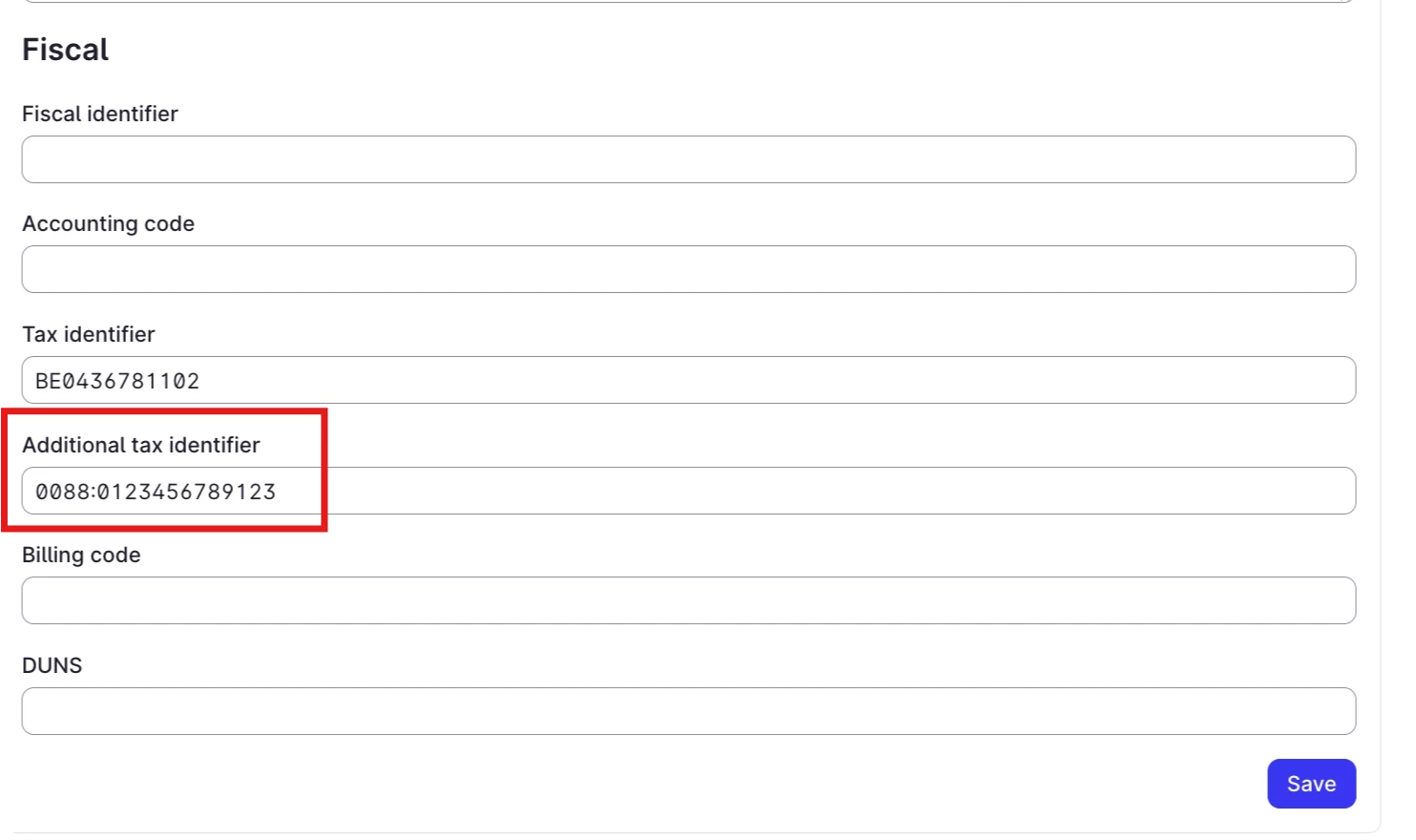
After saving:
- On the bill screen, you will see a field labelled Peppol ID showing the value from Additional tax identifier.
- In the Fiscal record report, the Peppol ID column will also display this value for each fiscalized invoice.
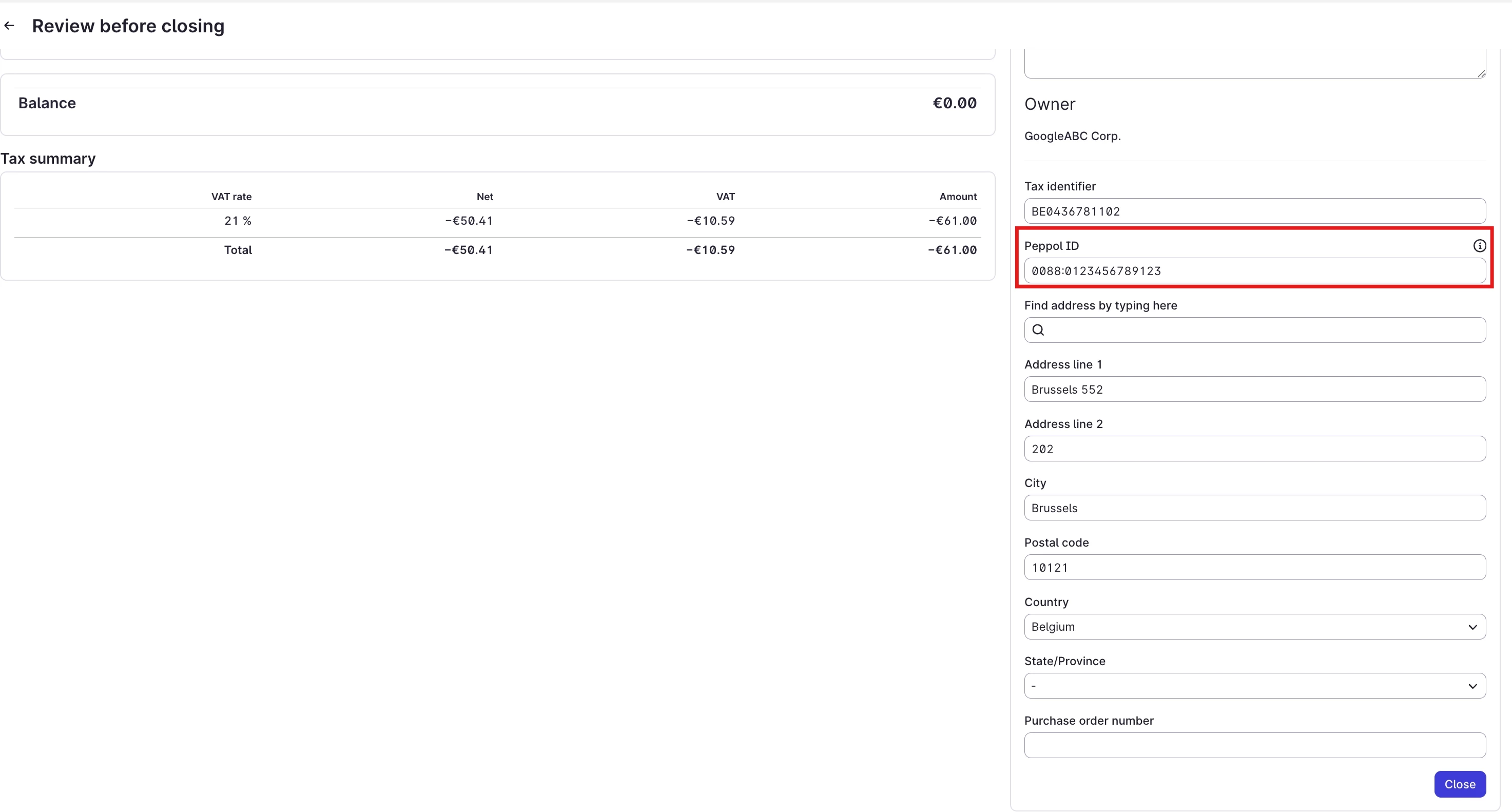

In short, for Belgian Peppol:
- Tax identifier = VAT/KBO → legal ID printed on the invoice.
- Additional tax identifier = Peppol ID → routing address used by Peppol (displayed as “Peppol ID” on bills and in the Fiscal record report).
If you already use Additional tax identifier for something else and now need to send invoices via Peppol, please contact Mews Support with an example company and invoice so we can review the best setup for you.
What about GLN (0088:…)?
Some Belgian customers use GLN (Global Location Number), for example values starting with 0088:….
The Belgian Peppol ID configuration in Mews now supports GLN alongside the other main Belgian schemes:
- You can enter a GLN such as
0088:1548079098355in the Additional tax identifier / Peppol ID field. - As long as the GLN is correctly formatted and registered in Peppol, Mews will use it to route the invoice to the correct Peppol inbox.
If you are given both:
- a VAT‑based Peppol ID (e.g.
9925:be0123456789), and - a GLN (e.g.
0088:1548079098355),
you can use whichever Peppol ID your accountant or customer explicitly asks you to use.
Summary / recommended actions
-
If you are not sure what your Peppol ID is
→ Leave the Additional tax identifier / Peppol ID field empty. Mews will keep using your VAT/KBO as today. -
If your accountant or customer gives you a specific Peppol ID (0208 / 9925 / 0088)
→ Enter it in the Additional tax identifier field on the company profile.
→ Keep your Tax identifier (VAT/KBO) unchanged. -
If you are given a GLN (0088:…)
→ You can safely enter it (for example0088:1548079098355) in the Additional tax identifier / Peppol ID field, provided it is the ID they expect you to use for Peppol invoices.
If you are unsure about your setup, or you see Peppol errors after changing the Peppol ID, please contact Mews Support with an example invoice number so we can review it with you.