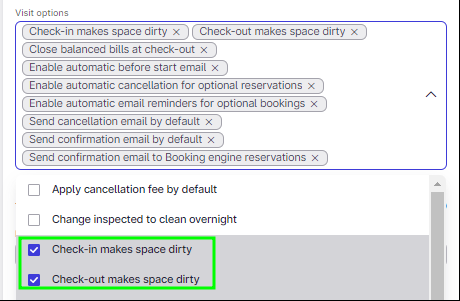
Hi - We are not using the housekeeping functionality - and it is a bit of extra time each day to mark each room as inspected. Is there a way to turn off the changing status? So that we are always in the green - unless we mark the room as “out of service” or “house use” ?
Hi @Ethros if you wish me to have a closer look which functionality changes spaces to dirty, please send me an example to [email protected] (attention Joanna).
There is as well default change due to Legionella, meaning if the status of a space has been on cleaned or inspected for 7 days, Mews will change the status of this room to Dirty (Legionella) after the 7th night. Note:This setting can be disabled upon request as long as it is not a legal requirement. -Edit January 2024 - the setting cannot be disabled for individual properties, this was switched of once for a whole legal environment.
HI - Is there any chance of disabling the housekeeping? We still either have to live looking at “DIR” tags on all rooms and “DIRTY” on the dashboard - which is a bit uninspiring to say the least, or go through and manually inspect rooms every day.
I’m trying support as well - and I never get anywhere.
Disabling housekeeping completely is not an option currently. It’s an important feature in order to make sure the guests are receiving a proper level of cleaning.
Even with the above mentioned workaround setup, the room will turn dirty - the latest after 7 days due to legionella status. That can not be disabled due to legal requirements, as legionella prevention is crucial for hygienic purposes.
Regards,
I understand.
We will for sure not force you Usually, when the housekeeping is performed on apps outside of Mews, they can be then integrated, so the statuses can still change based on your performed actions withing that system.
If your HSK is not in a digital form, that is still fine. The only difference then will be the fact that “dirty” status will be the default one.