Hallo zusammen,
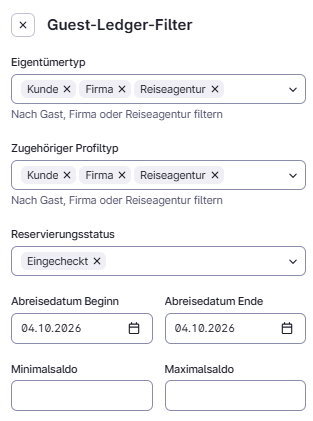
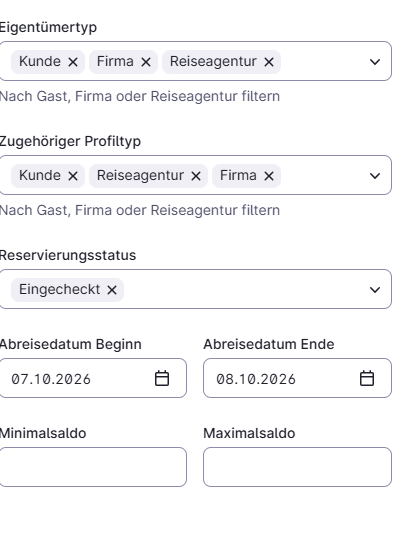
ich stehe auf der Leitung. Wenn ich den Filter beim Guest Ledger so ausfülle:
kommt eine leere Liste.
Es ist der 3. und ich möchte alle Abreise-Salden vom nächsten Tag. Wo ist der Haken? Was habe ich übersehen?
Oder kann der Bericht nicht in die Zukunft?
Danke und viele Grüße
Leif
Hi @Leif_Penning ich glaube du musst ihm ein von bis Datum geben.
Dann zeigt er Werte an.
Hallo Johannes,
ja, ok. Da kommt dann was, allerdings nur, wenn man die Felder Eigentümertyp und Profiltyp komplett leer lässt. Sonst erscheinen scheinbar nur die Debitoren. Aber immerhin.
Danke.
Viele Grüße
Leif
Hi Leif,
Good to hear the list is showing results now. You are right that leaving those two fields empty is the way to see everything.
In the Guest ledger, each filter you set narrows the list. Owner type and Associated profile type only show bills that match the value you pick. If you leave them empty, the ledger does not filter on them.
To see all balances for guests departing tomorrow:
- Go to the main menu > Finance > Ledgers > Guest ledger.
- Click Filter.
- Leave Owner type and Associated profile type empty.
- Set Departure date start and Departure date end to tomorrow’s date.
- Click Apply filters to confirm.
A blue dot on the Filter button shows that one or more filters are active. The Outstanding balance total also updates to match your active filters, so you get the total for tomorrow’s departures. To start over, click Reset filters.
If you also want to narrow the list by a specific guest or bill, you can type the owner, profile or bill into the search bar instead of using those type filters.
I hope this helps