Is anyone here already using the new automations in Mews and could perhaps help us?
We’d like to automate a few simple workflows, e.g., that a housekeeping task is automatically created as soon as the ‘Pet’ product is added to a reservation.
Does anyone here have experience with this and can share some tips?
I’ve also been experimenting with the new automations lately and have now built a working automation for creating housekeeping tasks.
For simple time-triggered workflows, the setup that has worked for me is the following:
Scheduler (daily or at the desired time)
Get Eligible Arrivals
Create Task
It’s important that the required fields (e.g., task name, due date, and department) are filled in and that the variables from the previous step are carried over.
For your example (“pet” was added to a reservation), I would, however, use a different trigger. I’m not sure if there is currently a trigger for adding a product. If not, one might perhaps work via a Scheduler and appropriate filters.
The feature is still in beta, so I’m still experimenting myself.
I’ll try again. However, I think that the module “Automations” is currently a bit too complicated to set up. I hope the live version will be easier to use and more understandable later.
Currently we use automations in Flexkeeping – there they can be created much more easily.
Yeah, I still find it quite complicated (though it’s already better than in the first version); I only managed it with the help of AI and lots of screenshots and a lot of trial and error — when the task was created, it felt like a small triumph
Hi Vivien, I just happened to discover that there’s now an AI feature in automation, where you only need to describe what you want to automate, and it will set everything up.
I haven’t dared to activate it yet, but I want to dive a bit deeper into it next week, but it already looks pretty cool — I’m curious to see if it works the way I hope
I’m also totally excited about what I’ve seen so far. Everything I wish for hasn’t quite come together yet, but I’m confident there’s a lot more to come huge added value
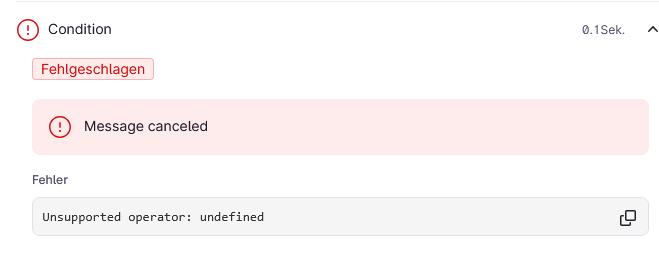
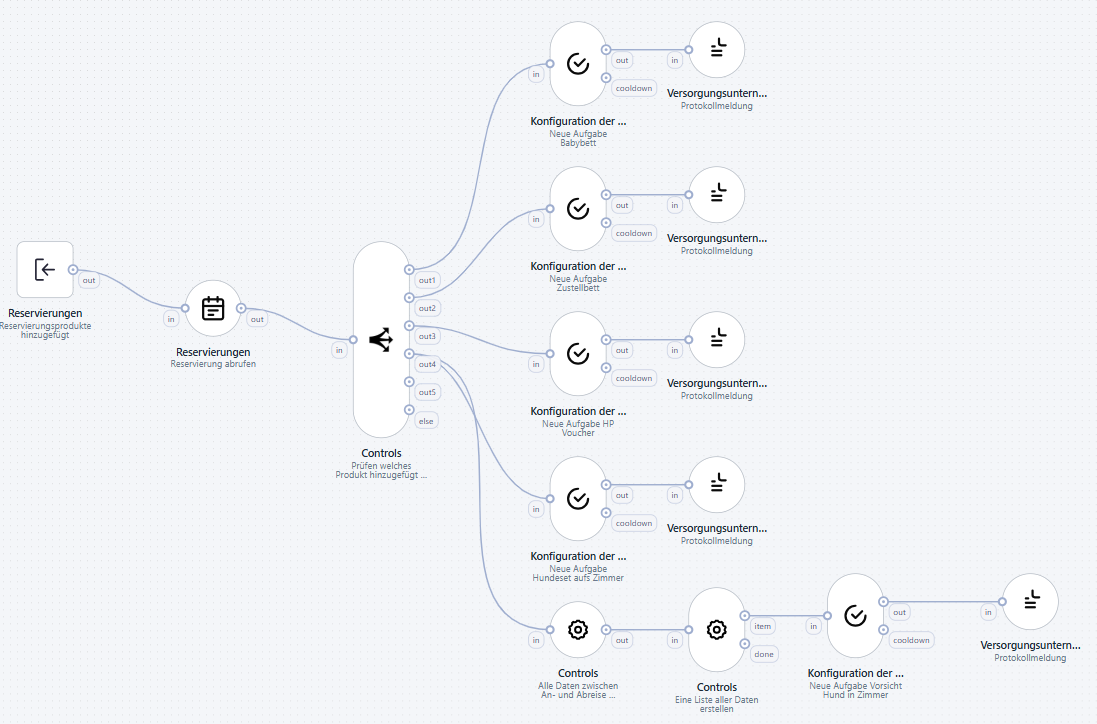
I’m still working my way through a few simple scenarios. Adding Early Check-In, which automatically changes the arrival time and also automatically generates a task, works flawlessly; with Late Check-Out and with the baby cot, nothing responds yet.
The error message in the execution log would be this
^^ By the way, I managed to find the bug. Don’t describe it when the product has been added, but “when the product has been added via the line items”, then it works
Hey Sonja, I built the whole thing with a baby crib, an extra bed, etc.—do you still need any help?
@Johannes_Rott, similar to Sonja I also want to build a Flow that deletes all linked tasks as soon as the room is canceled. For this, we would need 1) a trigger “as soon as a reservation is canceled” which could be handled with a schedule, but 2) and more importantly the action “delete tasks” by specifying the reservation ID
in one of our hotels things are going quite well, like ‘create a task when a product is added, notify housekeeping when booked for X people’ etc., and the check-in/check-out times also automatically adjust when ECI/LCO has been added. In the others it’s not running quite as I envisioned yet, but I think it will come together today as the day goes on.
Unfortunately there are still quite a few triggers missing, but I’m confident that a lot will get done there
@Sonja I was actually told that automatic deletion is already working… upon further inquiry, this only applies to automations via Flexkeeping and not via MEWS — they are working hard on a solution.
Thanks for the discussion, we recognise that limitations with the task functionality undermines the usefulness of automating some tasks as they are not removed when the reservation is cancelled or moved if the reservation is moved. I would recommend trying to set up your automations so that the tasks are created as close to the arrival date as possible to minimise the chance of an amendment. We have been talking with the team who own tasks and they have plans to improve the functionality in 2027 to align with the housekeeping tasks.
In the interim we are considering adding the status of the reservation to the task list so that users can at least see a reservation has been cancelled from the list. Do you think this will help?
Displaying the reservation status in the task list would definitely be helpful as an interim solution, especially for cancelled reservations.
We currently have several automations that create housekeeping tasks as soon as a reservation is made, for example when a room is booked for three or four guests.
However, if an early check-in is added afterwards, the reservation’s arrival time changes from 3 PM to 1 PM, while the existing housekeeping task remains due at 3 PM.
Based on your recommendation, we’re now considering a different approach: running an automation one day before arrival to check which housekeeping tasks are required and create any missing ones using the reservation’s current details.
Do you think this would be a better approach for the time being?
One important question would be whether Mews Automations can check if a particular task already exists for a reservation, so we can avoid creating duplicates.
Ideally, we’d also like to detect tasks with outdated deadlines, but I assume this might be limited by the current task functionality.
We’re looking forward to the improvements planned for 2027!
My developer has worked some magic and they have actually managed to update the task functionality so that if the related reservation is cancelled any associated tasks will be also be cancelled. This will be deployed to production tomorrow afternoon so you should see this working by the end of the week.
It still doesn’t resolve the issue if the reservation dates are moved so it might still be best to consider if your tasks can be created closer to the date that they are required.




 thank you! We’ll watch out for it
