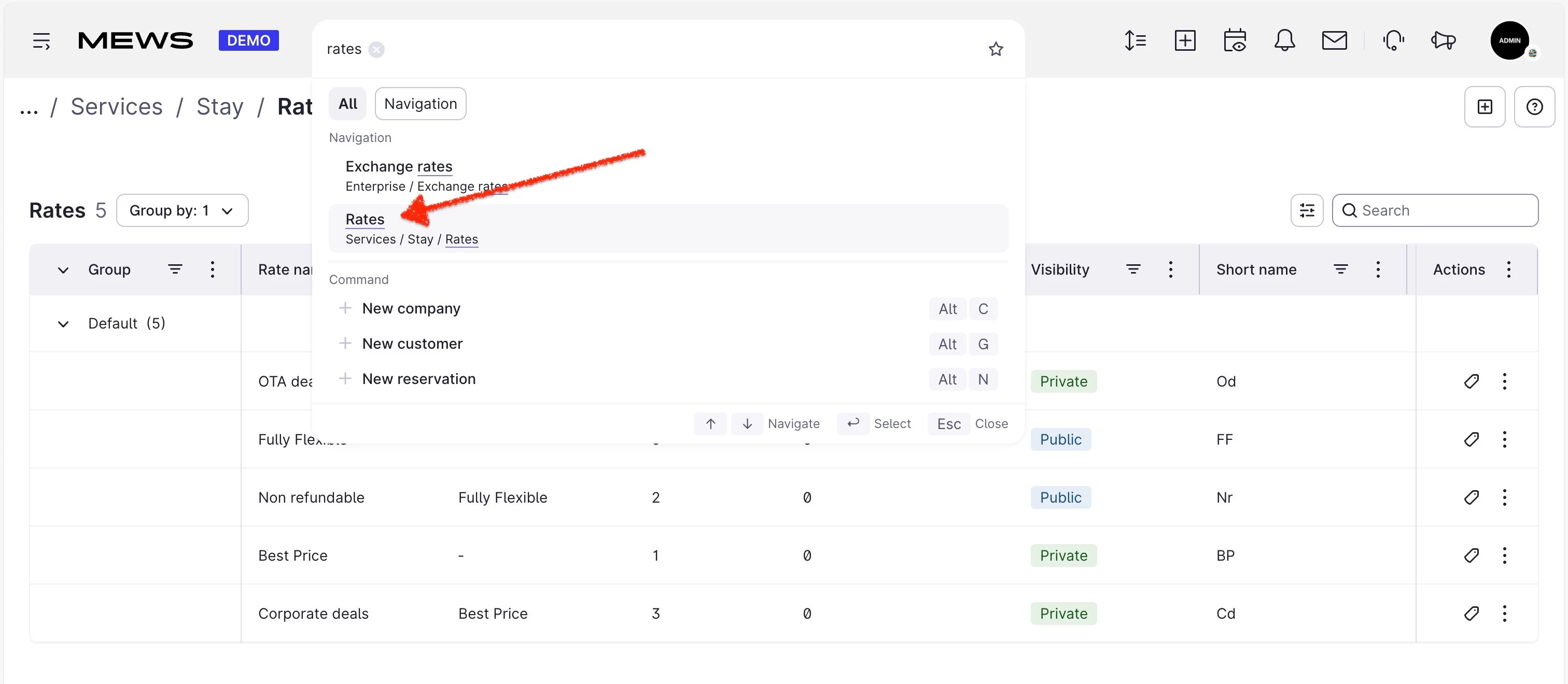


Rates page now allows for grouping by rate-groups

  • March 18, 2026
  • 16 replies
  • 176 views

saurabh.bhatia
Mews Employee
Forum|alt.badge.img

Hello Mews Community,

@ettore.zotarelli has helped us build the capability to group by rate-group in the rates page. This functionality was removed when migrating to the new tables, and is being reintroduces now.

We would love feedback on the same, and have deployed it to your Demo environments for testing. There on the rates page (list of rates), you will see the updated table, allowing grouping by rate-groups, and a new universal search bar that can help navigate to the right rate(s) quickly and efficiently.

Let us know what you think!

16 Replies

Tobias Sörling
Forum|alt.badge.img+3

Hello Saurabh! 

We would love to test this out. Please add it to our Demo environment! 


Linus.Bihn
Community Catalyst
Forum|alt.badge.img+2
  • Community Catalyst
  • March 18, 2026

Hi,


i just checked the rate page in our demo and i like that there are more options to filter. However the “old” rate page is not so overloaded and showing less data without the need to “scroll” from left to right


Best

Linus


ettore.zotarelli
Mews Employee
Forum|alt.badge.img+1

Hi ​@Tobias Sörling ! Long time no see! It's already enabled to all demo accounts!

@Linus.Bihn indeed there's a bit more width, but do you think that's an acceptable tradeoff considering the superior filtering options, and that one can now select which columns to see? Keep in mind that one can bookmark that page with the preferred layout (columns to view/hide and their order) so for power users like yourself/a revenue manager etc, they could keep the page saved on their browser with their preferred look!

Thanks for being awesome partners! Looking forward to hearing from y'all!


szaboz
Forum|alt.badge.img
  • Navigator
  • March 19, 2026

Hi,

I have tested the new layout, grouping and filtering features. I think this is awesome! I love that you can show/hide or reorder columns or even pin them either left or right. The option to collapse groups also perfect!

Further ‘features’ to be considered:

  • Rate group short name to be added to the list
  • Base rate short name to be added to the list
  • Option to edit rate group details directly from the list
  • Option to edit rate restrictions directly from the list

Hope it helped!


Great work! 👏👏👏


mauritsbots
Trailblazer
Forum|alt.badge.img+4
  • Trailblazer
  • March 19, 2026

@ettore.zotarelli  love it! as ​@szaboz mentioned, having that option to edit straight from this view would be a very nice addition but this is already helpful. 

And.. it could be nice (as with all reports) to create ‘property’ or ‘chain level’ defaults..


jeffzarrinnam
Forum|alt.badge.img

Please add it to our Demo environment as well @hollywoodhotel

Thanks

Jeff


Johannes Rott
Community Luminary
Forum|alt.badge.img+2
  • Community Luminary
  • March 20, 2026

Hi @all, i like the new view. It is a lot more easy to find and sort the rates… looks nice.

Same opinion like ​@szaboz for missing features.
Thanks for your consideration.


ettore.zotarelli
Mews Employee
Forum|alt.badge.img+1

Please add it to our Demo environment as well @hollywoodhotel

Thanks

Jeff

Hi Jeff, it's enabled for all demo properties. Looking forward to your feedback!


Tobias Sörling
Forum|alt.badge.img+3

Hi ​@Tobias Sörling ! Long time no see! It's already enabled to all demo accounts!


Heeeey ​@ettore.zotarelli 
Yes its been a very long time. How are you doing now days? Will I see you at Unfold this year?
Awesome news, I will have a look at this next week then! And I would all ready +1 to show shortnames! That is so much easier for us that work with rate loading and such to remember rather then the full name of a rate! 

Have a lovely weekend! 


saurabh.bhatia
Mews Employee
Forum|alt.badge.img
  • Author
  • Mews Employee
  • March 23, 2026

Hi team,
We are rolling this out on production environments as well. We have made notes on the improvements suggested here! Thanks for that :)

Please keep us posted on any more feedback you have here as it really helps improve the product

Thanks again


Linus.Bihn
Community Catalyst
Forum|alt.badge.img+2
  • Community Catalyst
  • March 23, 2026

Hi ​@Tobias Sörling ! Long time no see! It's already enabled to all demo accounts!

@Linus.Bihn indeed there's a bit more width, but do you think that's an acceptable tradeoff considering the superior filtering options, and that one can now select which columns to see? Keep in mind that one can bookmark that page with the preferred layout (columns to view/hide and their order) so for power users like yourself/a revenue manager etc, they could keep the page saved on their browser with their preferred look!

Thanks for being awesome partners! Looking forward to hearing from y'all!

Hey Ettore,


yes of course it is acceptable as this view gives more options in case of filtering and viewing data which is great!


Mathias Rajczak

That would interest me too. Please activate it for the Brauereigasthof Hotel Aying as well.

Thanks,


Mathias


Forum|alt.badge.img+2
  • Navigator
  • March 23, 2026

I might have misunderstood: is this live in the Mews environment? Our revenue team informed me on the current situation: It's nice to have the option to filter on rate-group. However i would love to see a drop down menu for this instead of have to write the group name. This could also be applied to the segment section. This would make it a lot easier to work with. And I'm also missing the universal search bar in our system.


please let me know if younhave questions!


ettore.zotarelli
Mews Employee
Forum|alt.badge.img+1

Hi ​@Mathias Rajczak and ​@Kirsten !


It's currently available for all properties on the demo environment, coming to all production (live) accounts in a week or so as our content team finishes preparing the announcement in all languages

Thanks all for the feedback!


Mathias Rajczak

Thanks, but now you've got to help me out—where exactly can I find those settings? The plan selection still looks exactly the same as before.


Dear


Mathias


ettore.zotarelli
Mews Employee
Forum|alt.badge.img+1

Thanks, but now you've got to help me out—where exactly can I find those settings? The plan selection still looks exactly the same as before.


Dear


Mathias

Hi! It's on the Rates page - only available to you on the demo environment at the moment.