

(CLOSED) 📯 New Beta! Customize your Mews emails in a user-friendly way!

  • May 13, 2025
  • 176 replies
  • 2975 views

Show first post

Closed for Commenting

If you have a follow-up or related question, please create a new question . This helps us keep topics up to date.

176 Replies

ettore.zotarelli
Mews Employee
Forum|alt.badge.img+1

@ettore.zotarelli 

for now this is great! only issue we have is that some translations into german are not shown.

do we need to translate them manually?


Hi ​@Johannes Rott ! I have checked the settings and indeed this was a bug with translations on some specific email types. We fixed it already and now all the "default" emails should be fully translated.

Since your email was customized before our fix (you were very quick!) it did not override it. The fix would be to reset back to the default and then change the colors again (I think that was the only customization made?).

I made a video to hopefully make it easier - sorry about the inconvenience. 


mauritsbots
Trailblazer
Forum|alt.badge.img+4
  • Trailblazer
  • May 21, 2025

@ettore.zotarelli can you activate this in all my props? 


ettore.zotarelli
Mews Employee
Forum|alt.badge.img+1

@mauritsbots I was getting worried again! Where were you all this time? 😅 Enabled!


Btw, I'm staying at City Centre Amsterdam and the bread y'all serve at breakfast is extraordinary. 😍


Mathias Rajczak

Liebes MEWS - TEAM,


bitte um Beta Version


Brauereigasthof Hotel Aying


Mathias Rajczak


ettore.zotarelli
Mews Employee
Forum|alt.badge.img+1

Liebes MEWS - TEAM,

ask for beta version

Brauereigasthof Hotel Aying

Mathias Rajczak

Hi ​@Mathias Rajczak 

You're added! Have a great evening!


Hello Ettore,


We asked to activate this tool for us several days ago, no news from you! Pkease, would you enable it?


thanks!!


ettore.zotarelli
Mews Employee
Forum|alt.badge.img+1

Hello Ettore,

We asked to activate this tool for us several days ago, no news from you! Pkease, would you enable it?

thanks!!

Hi Horacio! I have enabled for you together with the others last week. Please check out this video to see how to access them, as you got most of your emails already customized in the "old" templates

Cheers!


Ivo
Forum|alt.badge.img+1
  • Rising Star
  • May 22, 2025

Hey ​@JulieLVQ I’m a Product Designer that’s been working on the new email editor 😀

I saw your question about copying new templates (made in the new editor) to another service. I’d like to learn more about this and why would you’d like to do that? What kind of other service would you copy your email template to? Could you share a scenario? Thanks!

We manage 8 different hotels, each with its own brand and concept. However, our email structure remains largely the same across all properties. Being able to copy templates is incredibly helpful and saves a lot of time. After copying, we simply adjust the logo, brand colors, and a few content elements to match the specific hotel.

So for us, it’s less about copying templates to a different service, and more about reusing a base template across different brands within the same environment. The ability to easily duplicate and slightly tweak templates is essential for efficiency in our workflow.

Happy to explain more if that’s helpful!


Ivo
Forum|alt.badge.img+1
  • Rising Star
  • May 22, 2025

I’ve only just had the chance to take a look at this new functionality. This is a great improvement! It looks great and is such a welcome addition. Thank you for making this happen!

As a possible next step, I’d love to suggest exploring dynamic content in our email templates. This would allow us to tailor messages based on the guest’s booking or preferences, making communication even more relevant and personal.

Here are a few examples:

  • If breakfast is booked:
    “We’ve already added your breakfast to your stay – no need to worry about the most important meal of the day!”

  • If early check-in is added:
    “You’ve booked early check-in, so feel free to arrive anytime after 12:00 – we’ll have your room ready.”

  • If the guest is a returning visitor:
    “Welcome back! We’re so happy to have you with us again.”

  • If the stay is longer than 3 nights:
    “Since you’re staying a little longer, let us know if you need anything extra to make your stay even more comfortable.”

  • If specific dates match an event period:
    “There’s a great event happening in the city during your stay – [Event Name]! You can find more info and tips here.”

  • If the booking came through a specific channel (e.g. OTA):
    “We’ve received your booking via [OTA Name]. We’re looking forward to welcoming you soon!”

Being able to show or hide certain blocks of content based on simple logic (e.g. products, booking source, dates, or other attributes) would make our emails smarter, more efficient, and much more personal.

Would love to hear your thoughts on this!

Ivo


  • Contributor
  • May 22, 2025

Please add Pension Almhof Baumgarten. 

Thanks


Forum|alt.badge.img+1
  • Mentor
  • May 22, 2025

Hello ​@ettore.zotarelli 


Could you please activate it for Hotel le la Couronne in Liège Belgium please? On both demo and live ?


Thx


Stephane


Maikel Heinen
Forum|alt.badge.img

We would love to production with it! Maikel Gitstapper Hof


Hello Ettore,

We asked to activate this tool for us several days ago, no news from you! Pkease, would you enable it?

thanks!!

Hi Horacio! I have enabled for you together with the others last week. Please check out this video to see how to access them, as you got most of your emails already customized in the "old" templates

Cheers!


Thank you Ettore!!! I got it now :)

Is not possible to upload a picture directly right? I can’t change the picture on the emails, the onne I have added is not automatically updated in of the tempates… Any tip for this?  And what about the Qr code in confirmations or before check in, how can we insert them?

Gracias!!!


Hello Ettore,

We asked to activate this tool for us several days ago, no news from you! Pkease, would you enable it?

thanks!!

Hi Horacio! I have enabled for you together with the others last week. Please check out this video to see how to access them, as you got most of your emails already customized in the "old" templates

Cheers!

Thank you Ettore!!! I got it now :)

Is not possible to upload a picture directly right? I can’t change the picture on the emails, the onne I have added is not automatically updated in of the tempates… Any tip for this?  And what about the Qr code in confirmations or before check in, how can we insert them?

Gracias!!!


Johannes Rott
Trailblazer
Forum|alt.badge.img+2

@ettore.zotarelli 

for now this is great! only issue we have is that some translations into german are not shown.

do we need to translate them manually?


Hi ​@Johannes Rott ! I have checked the settings and indeed this was a bug with translations on some specific email types. We fixed it already and now all the "default" emails should be fully translated.

Since your email was customized before our fix (you were very quick!) it did not override it. The fix would be to reset back to the default and then change the colors again (I think that was the only customization made?).

I made a video to hopefully make it easier - sorry about the inconvenience. 


Hi ​@ettore.zotarelli thanky for the hint! the video is not valid anymore but i am quite sure that i know what to do! the auto translation is available to the 6 “mewsed” languages correct? Or do we need to do it manually as before?

is there any chance we could auto assign a room picture from the categories in MEWS? would make it a bit nicer for our costumers.


Johannes Rott
Trailblazer
Forum|alt.badge.img+2

@ettore.zotarelli 

for now this is great! only issue we have is that some translations into german are not shown.

do we need to translate them manually?


Hi ​@Johannes Rott ! I have checked the settings and indeed this was a bug with translations on some specific email types. We fixed it already and now all the "default" emails should be fully translated.

Since your email was customized before our fix (you were very quick!) it did not override it. The fix would be to reset back to the default and then change the colors again (I think that was the only customization made?).

I made a video to hopefully make it easier - sorry about the inconvenience. 


Hi ​@ettore.zotarelli thanky for the hint! the video is not valid anymore but i am quite sure that i know what to do! the auto translation is available to the 6 “mewsed” languages correct? Or do we need to do it manually as before?

is there any chance we could auto assign a room picture from the categories in MEWS? would make it a bit nicer for our costumers.

HI ​@ettore.zotarelli  still some bugs in there, no german translation at some points.


ettore.zotarelli
Mews Employee
Forum|alt.badge.img+1

I’ve only just had the chance to take a look at this new functionality. This is a great improvement! It looks great and is such a welcome addition. Thank you for making this happen!

[...]

Being able to show or hide certain blocks of content based on simple logic (e.g. products, booking source, dates, or other attributes) would make our emails smarter, more efficient, and much more personal.

Would love to hear your thoughts on this!

Ivo

Hi Ivo! Great suggestion and I am happy to say we are actively working on an initial version of this which is to segment pieces of the emails like you suggested. It will work by showing/hiding rows conditionally. The initial version will be based on the Segment in Mews, with the possibility of adding more parameters later.

In fact, if you are curious and look closely at the row settings of "Extras" in the default confirmation email, you will see that it disappears automatically if the reservation has no extras. 👀


ettore.zotarelli
Mews Employee
Forum|alt.badge.img+1

@ettore.zotarelli 

for now this is great! only issue we have is that some translations into german are not shown.

do we need to translate them manually?


Hi ​@Johannes Rott ! I have checked the settings and indeed this was a bug with translations on some specific email types. We fixed it already and now all the "default" emails should be fully translated.

Since your email was customized before our fix (you were very quick!) it did not override it. The fix would be to reset back to the default and then change the colors again (I think that was the only customization made?).

I made a video to hopefully make it easier - sorry about the inconvenience. 


Hi ​@ettore.zotarelli thanky for the hint! the video is not valid anymore but i am quite sure that i know what to do! the auto translation is available to the 6 “mewsed” languages correct? Or do we need to do it manually as before?

is there any chance we could auto assign a room picture from the categories in MEWS? would make it a bit nicer for our costumers.

HI ​@ettore.zotarelli  still some bugs in there, no german translation at some points.


Yes, the translation should be in the 6 "Mews" languages (maybe more coming up soon!) automatically as long as you do not edit the text from the default email. If you edit it, you will need to update that text block in every translated version manually.

The case you highlighted with cancellation feed and adults/children seems not to be translated yet into German - but should be done early next week.
Thanks for pointing it out!


About the auto assign a room picture - do you mean changing the header based on the room of the reservation? It's a nice idea, but what would happen if we got multiple room types in the reservation? Pick the first one? Or the most expensive maybe?

Happy weekend!


ettore.zotarelli
Mews Employee
Forum|alt.badge.img+1

Hello Ettore,

We asked to activate this tool for us several days ago, no news from you! Pkease, would you enable it?

thanks!!

Hi Horacio! I have enabled for you together with the others last week. Please check out this video to see how to access them, as you got most of your emails already customized in the "old" templates

Cheers!

Thank you Ettore!!! I got it now :)

Is not possible to upload a picture directly right? I can’t change the picture on the emails, the onne I have added is not automatically updated in of the tempates… Any tip for this?  And what about the Qr code in confirmations or before check in, how can we insert them?

Gracias!!!

Hi Horacio!

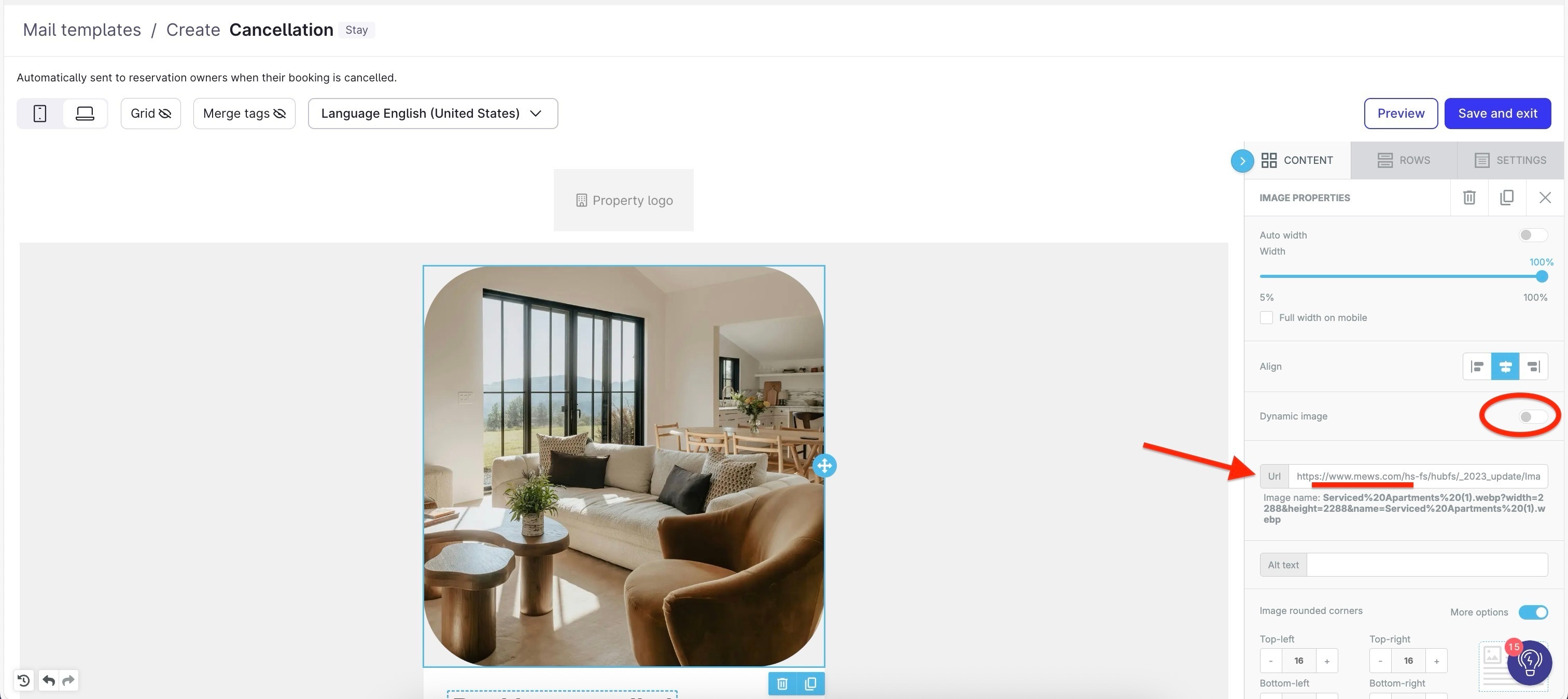
Thanks for the feedback! To update pictures, you must use a public link. For example a link to that picture on your website or another public storage service.
Here's an example with a picture from mews.com


About the QR codes,​ nice catch! I've opened a request to bring them back and they should automatically appear on default emails if the property has a Kiosk. Will keep you posted when they are back!

Cheers,
E​


ettore.zotarelli
Mews Employee
Forum|alt.badge.img+1

@Nicky ​@smehia ​@Maikel Heinen all added! enjoy!


ettore.zotarelli
Mews Employee
Forum|alt.badge.img+1

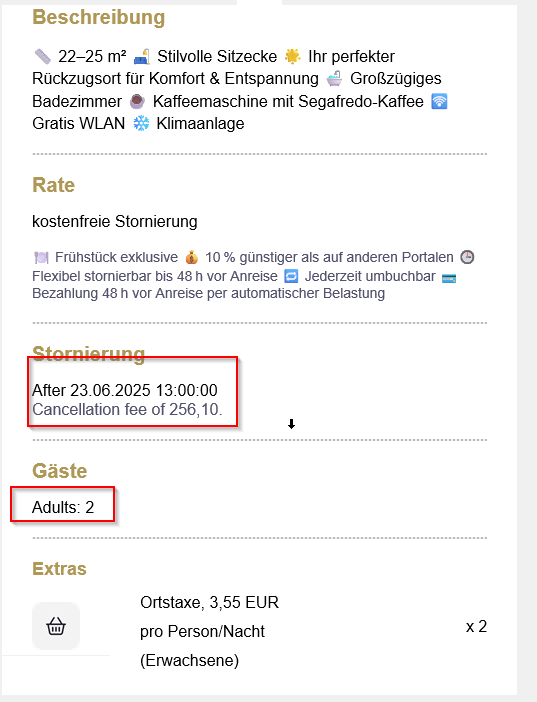
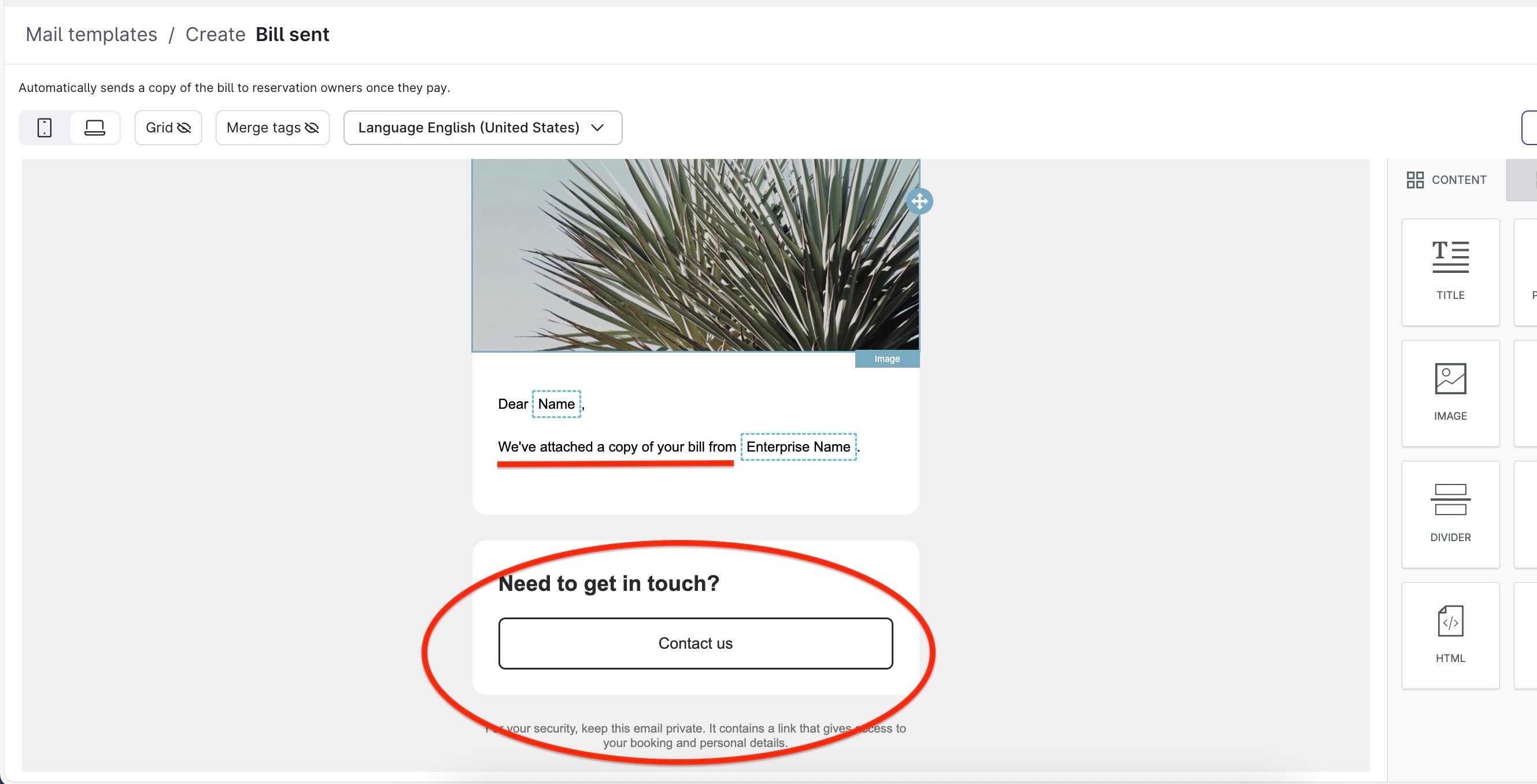
@Johannes Rott actually, my bad - some emails (the ones related to payments) are not fully translated yet as well. Those will need a quick review once they are done (some of the text is editable, like on this screenshot with the red marks).

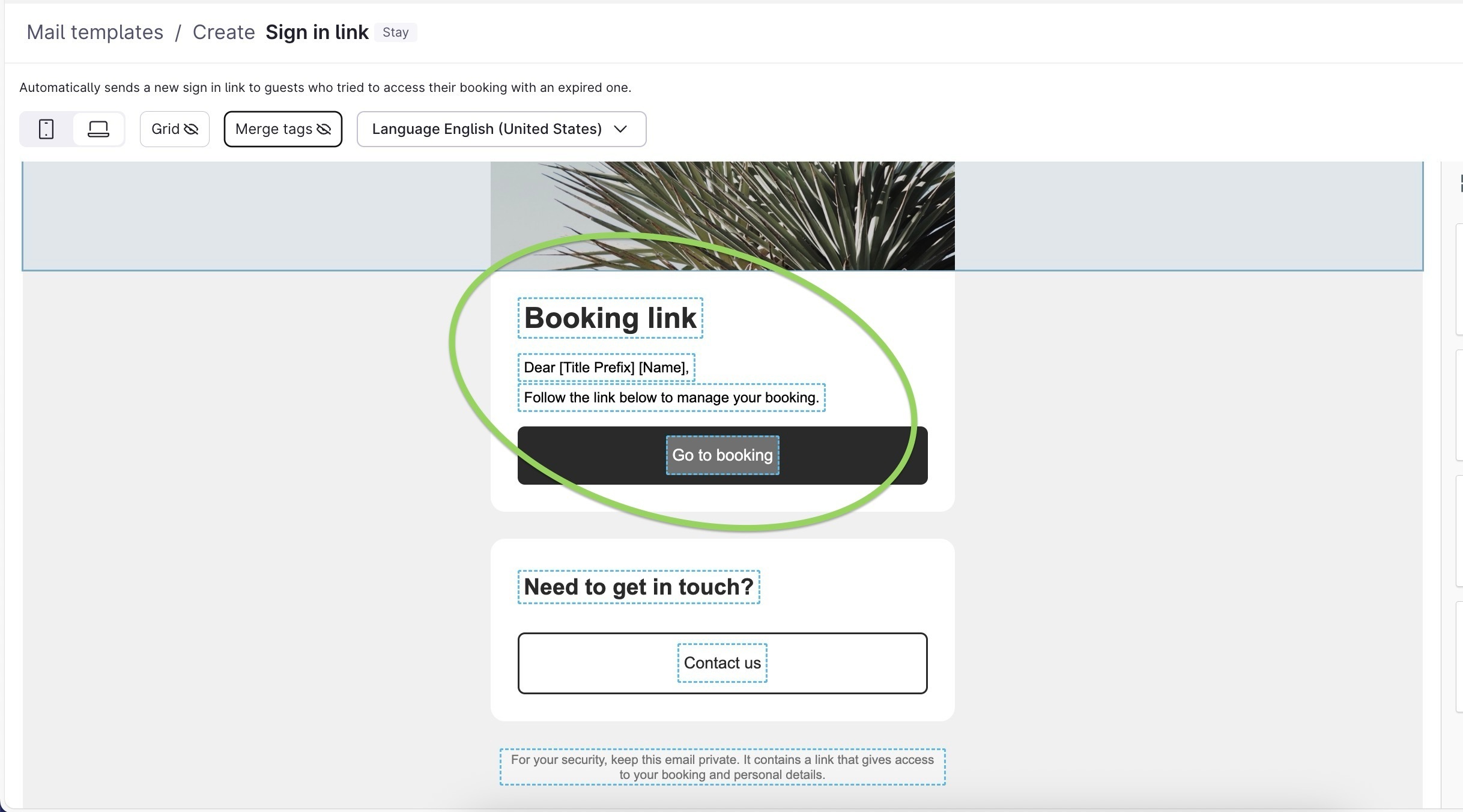
The editable text will soon be replaced by "blocks" that are read only (screenshot with the green circle). These read-only blocks are translated automatically in all Mews languages (and soon all 30+ languages!)


Sorry for the confusion, and thanks for the patience and collaboration! Have a great weekend!


Andreas Behl
Forum|alt.badge.img+1
  • All-rounder
  • May 23, 2025

@ettore.zotarelli 

Hi Ettore,

I'm also working on the new templates at the moment. First of all, thank you for dealing with this issue. The new tool really is worlds better than the previous one.

However, I still can't find a way to display the additional products with prices. I can only display products and quantity, is that correct, or what is the best way to proceed?

I am currently only working in the Design Hotel with the "Offer" template in the "Übernachtung service

Best regards
Andreas


Johannes Rott
Trailblazer
Forum|alt.badge.img+2

@ettore.zotarelli 

for now this is great! only issue we have is that some translations into german are not shown.

do we need to translate them manually?


Hi ​@Johannes Rott ! I have checked the settings and indeed this was a bug with translations on some specific email types. We fixed it already and now all the "default" emails should be fully translated.

Since your email was customized before our fix (you were very quick!) it did not override it. The fix would be to reset back to the default and then change the colors again (I think that was the only customization made?).

I made a video to hopefully make it easier - sorry about the inconvenience. 


Hi ​@ettore.zotarelli thanky for the hint! the video is not valid anymore but i am quite sure that i know what to do! the auto translation is available to the 6 “mewsed” languages correct? Or do we need to do it manually as before?

is there any chance we could auto assign a room picture from the categories in MEWS? would make it a bit nicer for our costumers.

HI ​@ettore.zotarelli  still some bugs in there, no german translation at some points.


Yes, the translation should be in the 6 "Mews" languages (maybe more coming up soon!) automatically as long as you do not edit the text from the default email. If you edit it, you will need to update that text block in every translated version manually.

The case you highlighted with cancellation feed and adults/children seems not to be translated yet into German - but should be done early next week.
Thanks for pointing it out!


About the auto assign a room picture - do you mean changing the header based on the room of the reservation? It's a nice idea, but what would happen if we got multiple room types in the reservation? Pick the first one? Or the most expensive maybe?

Happy weekend!

Hi ​@ettore.zotarelli  thanks for your feedback. I will wait until the final fix on the bug and then redo the changes from our side. 
 

regarding the picture it would be great if below the room type there would be automatically the combined the correct picture. 
 I would have some more things in mind. Shall we share here or on direct message. (Former Straiv user, there was a gap in functionality on html but now you are almost there) 


Forum|alt.badge.img
  • Navigator
  • May 23, 2025

Great news! We would like to try this in our demo environment. Kasteel Steenenburg. Thank you! 


Forum|alt.badge.img
  • Navigator
  • May 24, 2025

Hi Ettore, sounds great! Can you please add Penck Hotel Dresden (in production) to the beta testing? Thank you and happy weekend, Lisa