We have an old invoice in Mews that was paid through another system. As part of our cleanup, we would like to register an external payment against this invoice.
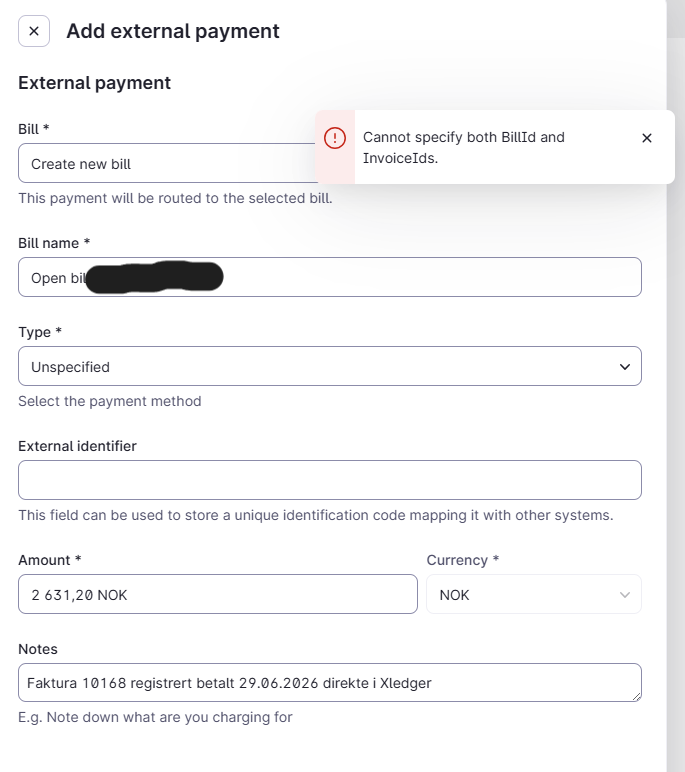
However, when we try to do so, we receive the following error message: “Cannot specify both BillId and InvoiceIds.”
We initiate the process from the invoice by selecting Add External Payment, but the window that opens asks us to create a new bill. And although we choose to do so, we are unable to register the payment against the existing invoice.
Could you please explain why this is happening and how we can resolve it? Is there a recommended way to register an external payment for an existing invoice in this situation?
I’m Josue - one of the Community Ambassadors - and I’m happy to help clarify your question regarding the error message you received. Firstly, please accept our apologies for the delay in our response.
Even though the window shows Bill: Create new bill, this error can still happen if Mews keeps the context of the original unpaid invoice in the background, when receivable tracking is disabled in your Accounting configuration.
In that situation, the system is effectively trying to do two things at once:
create a new bill for the external payment
link the payment to the existing invoice in the same step
That is why the error “Cannot specify both BillId and InvoiceIds” appears.
Receivable tracking being disabled prevents the payment from being linked directly to a closed invoice. In those cases, the usual workaround is to enable Receivables tracking temporarily (Main Menu > Settings > Property > Finance > Accounting Configuration > General settings) and then try adding the payment to the closed invoice (as you were attempting to via the page on the screenshot.)
If preferred, you can disable Receivable tracking after linking the payment.
If the same error still appears after following that flow, I would recommend contacting Support so the request can be reviewed in more detail.
I hope this helps! If you have any questions, please don’t hesitate to let me know!
~ Best regards,
Dear Josue,
Apologies for my late reply, and thank you very much for the detailed explanation. Our issue has now been resolved