(CLOSED) Increase revenue with upgrades in Online Check-in

Hi everyone – this Beta is now closed, as the feature was released in October. Thank you for participating!

You can learn more about how to set up online check-in here.

Excited about the launch? Here is a community post which explains how to drive online check-ins and unlock upselling opportunities.

Are you looking for ways to increase revenue? Do you find yourself with available capacity for higher priced rooms?

We’re excited to share this opportunity to join the Beta for our new upgrade capability in Online Check-in. Guests can now be offered available higher priced spaces when completing their online check-in to help boost your revenues and make their stay a little more special.

How does it work?
During Online Check In, Mews will check if there are any spaces in a higher category available. If so, the guest will be offered the upgrade and will be charged the new category price minus the price already booked.

  • Mews will only offer an upgrade to single reservations - groups are not supported.
  • Mews will not offer an upgrade if there is a restriction in place or there is no availability.
  • Mews will not offer an upgrade if the higher category is cheaper than the price already paid.

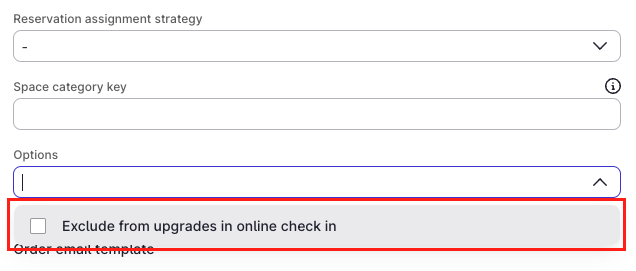
You’ll be able to set individual space categories where you would not like a guest to upgrade to. E.g. to avoid upgrades to accessible rooms. This can be found under “Options” in the “Space category” settings. Upgrades made by guests will be shown in the ‘Action log’ of the reservation.

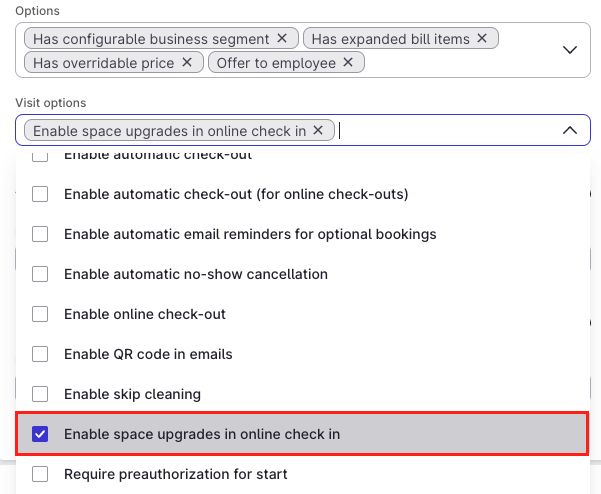
[EDIT] There is also a new setting “Enable space upgrades in online check-in” under the “Visit options” in your bookable service. This is selected by default when we enable the capability, but can be disabled if required.

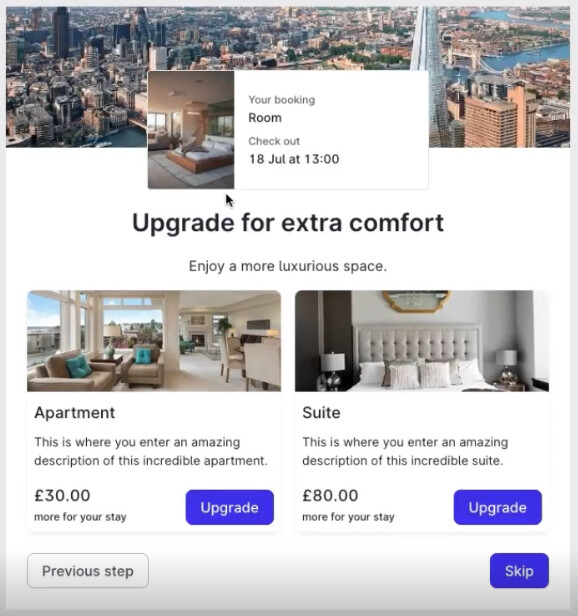
What do guests see?

Upgrades during online check-in

How can I get started?

  1. Reply to this thread with the property you’d like added to this beta
  2. I’ll enable the new settings so you can remove any space categories you don’t want offered as upgrades
  3. After 24 hours, I’ll enable upgrades to start appearing in the Online check-in for your guests (or after a longer time if requested)

Please ask any questions or share any feedback you have below.

20 Likes

We would like to add Hotel Playa Koralia.
Great feature !!

3 Likes

Wohoooo!

Yes, please!

Count us in - can we have it on a demo site in order to explore the action log and the postings logic?

If possible to have on Eden Locke demo site for edyn group?

Thanks, @james.taylor !

Igor

2 Likes

Great feature !
Please count Mercure Roeselare in !

2 Likes

Hi James,

Very interesting!

Before we decide anything, will you be able to select a fixed / discounted (%) price for the upgrade, or will the full price difference between both categories be proposed?

Can we maybe start testing in the demo version first?

Thank you.

3 Likes

Wow! Great! Waiting for this option quite a while! Yes, I would love to try this out! Thank you.

2 Likes

Thank you all for replying so quickly to this beta opportunity! :slightly_smiling_face:

@IgorK and @MatthiasH,

I have fully enabled this (step 1 & 2 from the post) in your demo properties so you can try this out.

@Ethros, @DamienJanssens and @samoanprincess,

I have enabled the settings so you can make any adjustments for the properties you mentioned.

I will plan to enable the upgrades for guests at your properties on Monday as we won’t have support over the weekend for any queries.

I look forward to hearing any feedback you might have!

3 Likes

Hi there! How do I enter my demo version? Haven´t done this for a long time! Thanks.

1 Like

@james.taylor where do we find the settings? Am I missing it under Settings->Services->Accomodation?

1 Like

Yay, how awesome! Count us in with the ahead burghotel please. Great news, James!

2 Likes

Ethros wrote:

@james.taylor where do we find the settings? Am I missing it under Settings->Services->Accomodation?

I’m not able to find the settings either.

1 Like

samoanprincess wrote:

Hi there! How do I enter my demo version? Haven´t done this for a long time! Thanks.

Hi @samoanprincess, I enabled the settings for your property in production and not demo.
I can then enable the experience for guests on Monday.

1 Like

Hi @Ethros @MatthiasH,

You should be able to see two new settings relating to upgrades…

  1. Under Settings → Services → Accomodation → Space categories → {space name}.

Under “Options” you can select “Exclude from upgrades in online check in”. This will prevent this space category from being offered as an upgrade option to guests.

  1. Under Settings → Services → Accomodation → Visit options.

“Enable space upgrades in online check-in” is enabled by default. This option enables you to switch off this upgrade capability for the specific bookable service if required.

Please let me know if you have any further questions though.

1 Like

Jonas wrote:

Yay, how awesome! Count us in with the ahead burghotel please. Great news, James!

Hi @Jonas, thank you for joining the group!

I have enabled the above mentioned settings for Ahead Burghotel.
I will plan to enable the experience for guests from Monday.

1 Like

YES ! please add it for YUST Antwerp and YUST Liegé!

Happy to check it out!

2 Likes

DirkVanGompel wrote:

YES ! please add it for YUST Antwerp and YUST Liegé!

Happy to check it out!

@DirkVanGompel I have just enabled the new settings for both properties.
I will plan to enable this in your online check-in at the end of Monday.

1 Like

A quick note for reference that the ordering of spaces is defined in “Space category” settings.

For example; with the below settings, a guest booked into a ‘Room’ category would see upgrade options for a ‘Deluxe room’ and a ‘Suite’ if available.

  • Room: ‘Ordering’ = 0
  • Deluxe room: ‘Ordering’ = 1
  • Suite: ‘Ordering’ = 2
  • etc.

I just added the help article link to the original post as well.

1 Like

Good morning, I have just enabled the the Upgrade capability in Online Check-in for guests for the first properties.

FYI @Ethros @samoanprincess @DamienJanssens @Jonas

@DirkVanGompel I will do this at the end of the day for you so you have time to adjust any settings.

1 Like

Good afternoon,

Would love to try out this Beta for upgrading capability in Online check-in. Would you be able to enable this for Golden Tulip Keyser?

Kind regards

2 Likes

@DirkVanGompel, I have now enabled the guest facing experience for the two properties you requested.

@Milou, thank you for reaching out! I have enabled the settings for the property you requested and will switch on the experience for your guests tomorrow morning.
1 Like