I am reaching out for assistance with automating the status change of online check-in reservations to “Started” on the day of arrival once the room has been inspected.
Currently, we use a diffenrent online check-in system, and we have achieved a high percentage (60-70%) of guests who are able to check-in online and have their reservation status set to “Started,” allowing them to access their digital room keys and enter their rooms seamlessly. This has greatly benefited our operations.
However, we are interested in integrating the Mews online check-in system for branding and integration purposes. I am seeking input and suggestions if there is a possibility to set this up. I was thinking it might be possible with Zapier to automatically change the reservation status to “Started” once the room has been inspected, based on the link sent out on the day of arrival.
Any insights or guidance on this matter would be greatly appreciated.
Yes, we are trying to really target the right guests with the right messages on the right channels. Working out pretty well so far. Doing that with Bookboost.
We are not trying to integrate any new System. Just would like to do online check-in via Mews and have guest use the navigator app. But for us, that only works if we can manage to automatically change the satus to “started” on the day of arrival.
Got the hint that this would maybe be possible to do with zapier but could not really find the correct trigger.
We’re in the process of testing out CRM solutions. I set a meeting with Bookboost for later today to learn more about them. I’ll see if they have any insight!
Hey @Hendrik_Renken!
Great question, I have a couple of possible solutions for you…
Checking in the room automatically when the room is inspected is challenging. It’s technically possible via our API but would require quite a bit of technical work on your end. It could be done via Zapier but would still require some API knowledge so I wouldn’t advise this.
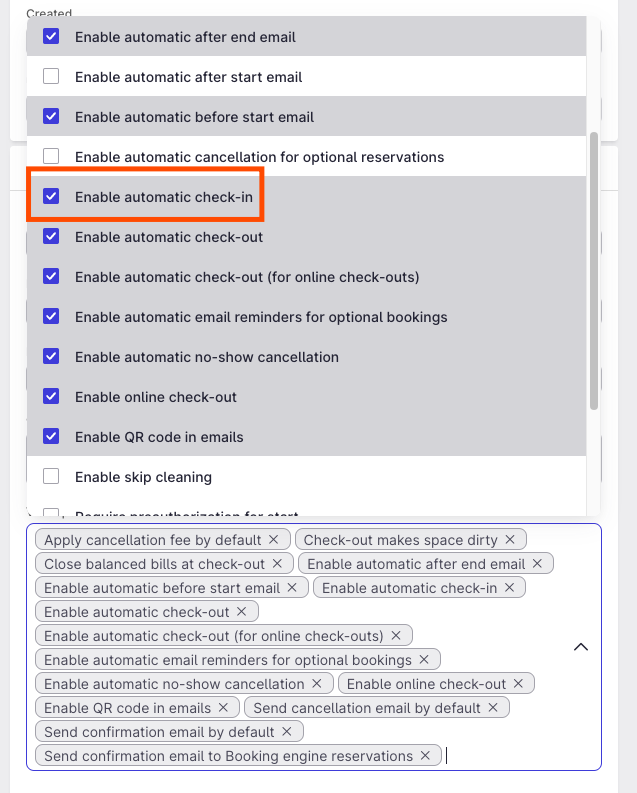
If you just want all of your reservations to be checked in automatically at their start time (regardless of if the rooms are inspected) you can do this directly in Mews. We have the setting “Enable Automatic Check In” in the Visit Options of the Bookable Service. Below is a screenshot:
Hopefully this would be sufficient for you? Let me know if you have any questions!
Unfortunately, implementing automated check-in for every reservation won’t be suitable for our needs.
Since we also intend to utilize Mews online check-in, it would be great if we could synchronize it with our system. Specifically, we would like the reservation status to change to “started” automatically on the day of arrival once a guest completes the Mews online check-in.
If it is possible to achieve this through the API, we are willing to explore the more complex route.
If you have any contacts or resources that can help us accomplish this, we would greatly appreciate your assistance.
Thanks for clarifying what you’re looking for with this solution.
Unfortunately at the moment we don’t display in our API whether a reservation has checked in online or not. I’ve spoken to the relevant product team though and they’re looking to add this soon.
In the meantime though, I believe that you’re using Goki as your lock provider, is that correct? What’s the reason that you want to use the Mews Online Check In, instead of the Goki solution?
Yes correct, we currently using Goki for that.
Of what i see the integration with mews Navigator and commander is better and i think it makes sense for guests to manage the booking themselves and have the Check-in file right in the PMS
Trying to make the Journey as clear, selfexplaining and easy as possible. And see that more if the whole booking/check-in/out process works via mews.
I spoke to our product team and was able to confirm that online check in status actually is already in our API, added just a few weeks ago, but isn’t yet documented (we’ll get on that soon.) I’ve therefore been able to build a zap that I believe should work for you.
It’s a little complicated and you would need to recreate it on your own Zapier account so it would be best if we could schedule a call and I can talk you through the solution.