we have a question regarding reporting for the bed tax.
We have here in Stuttgart the following regulations:
The hotel is the debtor
The bed tax is 3.00 EUR
0.21 EUR VAT is added on top
Total bed tax for the guest is thus 3.21 EUR
This is a fixed amount per person per night
Minors and student groups are exempt from the tax
We have set up the bed tax as a product
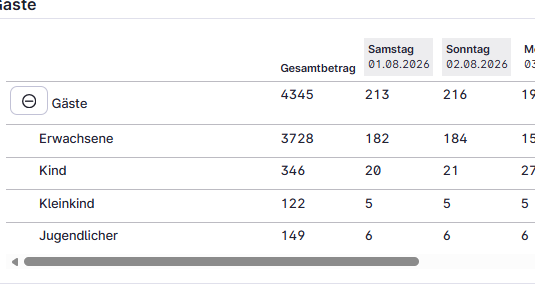
When reporting to the city for the settlement, we must report the total number of guests who stayed in the property for each month. From that, also how many adults and how many children per night.
Does anyone have the same requirements and can help us with the reporting? Which report is the right one to display all age categories per night and per person? Every report we use yields different figures and then again does not match the booked product report.
Does anyone also use the bed tax report and has the bed tax hard-coded?
Thank you very much for your reply. However, it is also the case for us that we have to apply the occupancy tax to cancellation and no-show fees. And when we have to report the occupancy tax and list the guests staying in the house, the reports unfortunately do not align with the number of guests… (Reservation report)
I’m Josue – one of the Community Ambassadors – and I’d be happy to help you clarify your question about the product report and the taxes.
Thank you for clarifying the requirements. In this situation I would separate the report for reporting guest counts to the city from the reports used to reconcile Bed Tax revenue.
Select the relevant stay service as well as the monthly or quarterly period needed.
Use the Age filter to separate adults and the corresponding categories for children/minors.
Export the daily results and use the headcounts for the city reporting.
This report shows how many guests stayed at the property on a given date, and is commonly used for municipal tax reporting. The age filter is also for cases where only certain age groups are taxable.
Der Produktbericht is helpful to review the product for Bed Tax. However, it should not be expected to match the total number of guests actually present in the hotel in every situation. The product section presents product quantities or charges, while the guest section maps the guests’ activities. Differences can arise because minors are exempt from tax or configured with a zero price, reservations canceled or changed, charges adjusted manually, credits recorded, or the tax not stored in the same way on every reservation.
Cancellation and No-Show fees should be reconciled separately. They are financial charges related to a reservation, not guests who actually stayed in the hotel. If these fees are included in tax bookings, this will naturally lead to a difference between the Product Report and the nightly number of guests actually present. If local regulations require that a municipal tax be booked for a No-Show, the tax product may need to be added to the No-Show reservation with the corresponding taxable amount. This should then be reflected in the financial reconciliation, but not in the number of guests who actually stayed.
For an additional reconciliation you can also export the Der Reservierungsbericht. The Excel export contains nightly reservation data and columns for the age categories. I would use it as a validation tool for nightly guest counts, while the Product Report or the Accounting Report are used to check the financial bookings.
If you have any questions, you can reach out to me anytime!