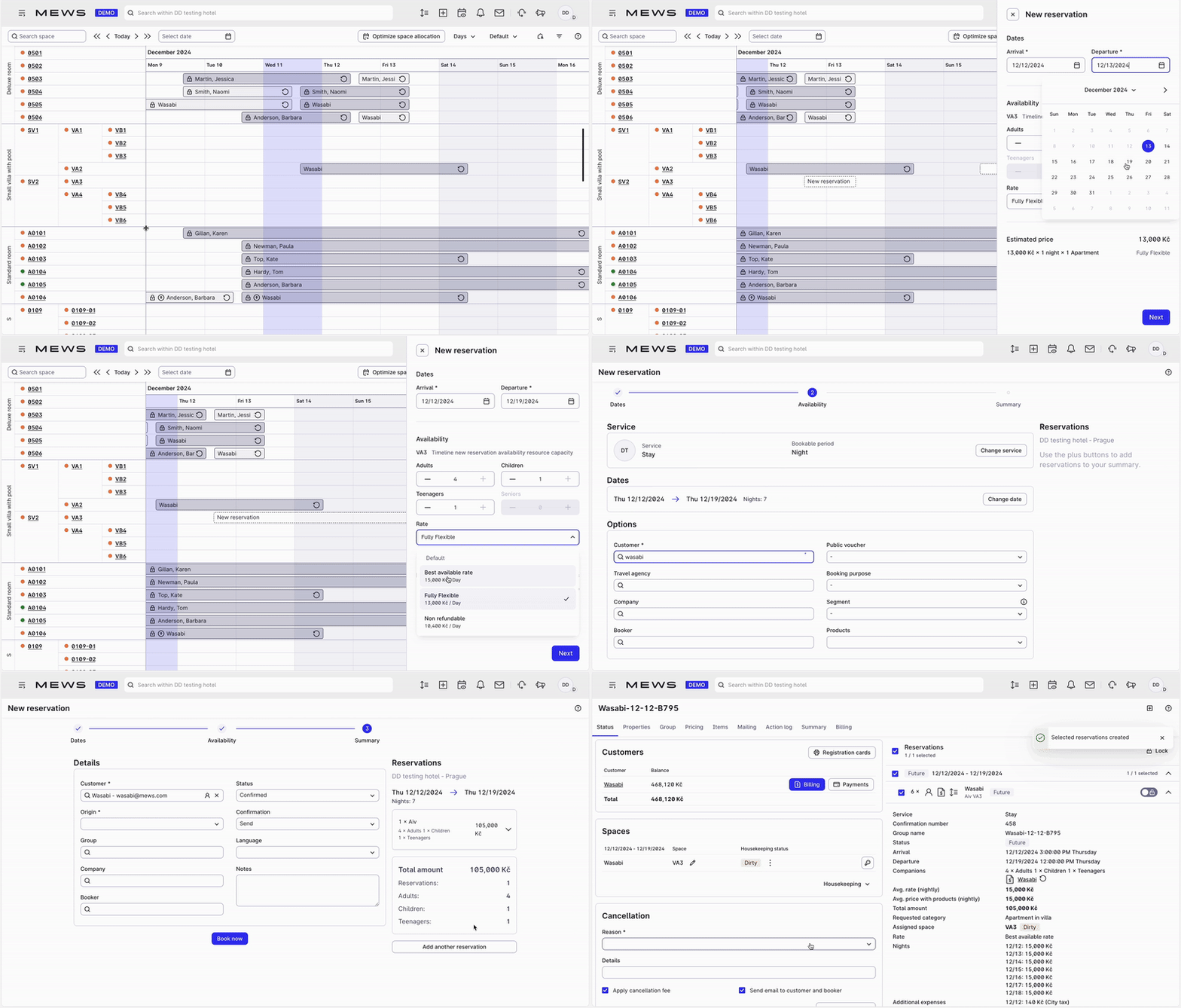
I’m happy to announce that we’ve completed a highly anticipated functionality—creating reservations directly from the Timeline. From now on, finding the right spot in the Timeline for a new reservation will be much easier and faster. !–>
Beta program info
Start: December 12, ~4 PM CET
End: January 17, 2025
What’s in it for you:
Better visibility to create reservation in occupied categories
A faster, streamlined reservation process directly from the Timeline
No need to switch back and forth between the new reservation screen and the Timeline to find the right spot
How can you get started?
To get early access in your Live environment:
Comment below with your property name or Enterprise ID.
Once you confirm your interest, we’ll activate the beta for your property starting from the program launch date or as soon as possible after reading your comment.
What you should know:
The reservations can be created on the Timeline view that’s matching your bookable period such as:
Service - Stay / Period - Nights → reservations can be created on the Day Timeline.
Service - Meeting room / Period - Hours → rooms can be booked on the Hours Timeline
The beta program runs through the Christmas season, so there will be limited availability for issue fixes during the holidays, from December 23 to January 5.
Critical feedback can be addressed before Christmas—please report any major issues by December 18.
If the functionality doesn’t work for you during this beta version, it can be easily turned off before Christmas.
Please share your thoughts and feedback in the comments. We’d love to hear from you and ensure this works perfectly for your needs!
Can you please add WestCord Fashion | ReservationsFashion to this test.
We are now on 17/12/2024 and we can comments about the feature until 18/12, so this very tight schedule, one that wouldn’t give us enough time to look at the feature
@Judithdebruin @pn3kronen @andante @Maurice @MikeRoefs @JulieLVQ @ReservationsFashion @JillMorgenthaler @Noah_T Enabled on production Please, have a look and let me know any feedback you have!
I’m happy to announce that we’ve completed a highly anticipated functionality—creating reservations directly from the Timeline. From now on, finding the right spot in the Timeline for a new reservation will be much easier and faster. !–>
Beta program info
Start: December 12, ~4 PM CET
End: January 17, 2025
What’s in it for you:
Better visibility to create reservation in occupied categories
A faster, streamlined reservation process directly from the Timeline
No need to switch back and forth between the new reservation screen and the Timeline to find the right spot
How can you get started?
To get early access in your Live environment:
Comment below with your property name or Enterprise ID.
Once you confirm your interest, we’ll activate the beta for your property starting from the program launch date or as soon as possible after reading your comment.
What you should know:
The reservations can be created on the Timeline view that’s matching your bookable period such as:
Service - Stay / Period - Nights → reservations can be created on the Day Timeline.
Service - Meeting room / Period - Hours → rooms can be booked on the Hours Timeline
The beta program runs through the Christmas season, so there will be limited availability for issue fixes during the holidays, from December 23 to January 5.
Critical feedback can be addressed before Christmas—please report any major issues by December 18.
If the functionality doesn’t work for you during this beta version, it can be easily turned off before Christmas.
Please share your thoughts and feedback in the comments. We’d love to hear from you and ensure this works perfectly for your needs!

 !–>

 Please, have a look and let me know any feedback you have!